
Bottom Line: Pictory AI is worth it if you need to turn scripts, blog posts, or long recordings into polished videos fast. It is not the right pick if you want creative control, need AI avatars, or have content in languages other than English. This review covers everything from pricing to the real frustrations users do not talk about.
I have spent time with several AI video tools, and Pictory AI sits in a specific and useful lane that its competitors do not quite occupy. It is not trying to be Synthesia or Descript.
It is trying to answer one question: given a piece of text or a recorded video, can we turn that into a publishable video in under 20 minutes?
The answer is mostly yes. The qualifications on that “mostly” are the useful part of this review.
What Is Pictory AI and Who Is It Actually For?
Pictory AI is a browser-based video creation platform that converts text, URLs, scripts, and recorded footage into edited videos using AI-selected stock media, auto-generated captions, and voiceovers.
The core workflow is deceptively simple: paste a blog post URL or a script, and Pictory divides it into scenes, selects stock footage from the Storyblocks library, applies transitions, adds captions, and generates a voiceover.
The result is a social-ready or content-marketing-ready video without touching a single video editing timeline.
That is genuinely useful for a specific type of content creator. Bloggers who want to repurpose written content into YouTube shorts or LinkedIn clips get immediate value. Podcasters and course creators who record long sessions and need the highlights cut down and captioned also land in the sweet spot.
Where it breaks down is for anyone who needs precise creative control, who works primarily in languages other than English, or who wants the polished human-presenter look that tools like Synthesia deliver with AI avatars.
Pictory does none of that. It is a text-and-media assembler, not a production studio.
Pictory AI Pricing in 2026
Pictory AI starts at $25 per month for the Starter plan, rising to $35 per month for Professional, with annual billing offering roughly 40% savings across tiers.
The full pricing breakdown:
| Plan | Monthly price | Annual price | Video minutes/month | Notable limit |
|---|---|---|---|---|
| Starter | $25/mo | $15/mo | 200 min | Watermark on free trial only |
| Professional | $35/mo | $21/mo | 600 min | Best for solo creators |
| Team | $119/mo | $71/mo | Custom | API access, multi-seat |
| Enterprise | Custom | Custom | Custom | Dedicated support |
The free trial gives you 3 projects up to 10 minutes each, all watermarked. It is enough to genuinely test the workflow before committing.
For most solo content creators, the Professional annual plan at roughly $21/month is the practical choice. The Starter plan’s 200-minute ceiling runs out fast if you are turning long-form content into clips regularly.
Pictory AI does have an affiliate program with 20 to 50% tiered recurring commissions if you are evaluating it from a content business perspective.
What Pictory AI Does Well
Pictory AI converts written content into video faster than any manual workflow, and the automatic caption generation is genuinely production-quality for English-language content.
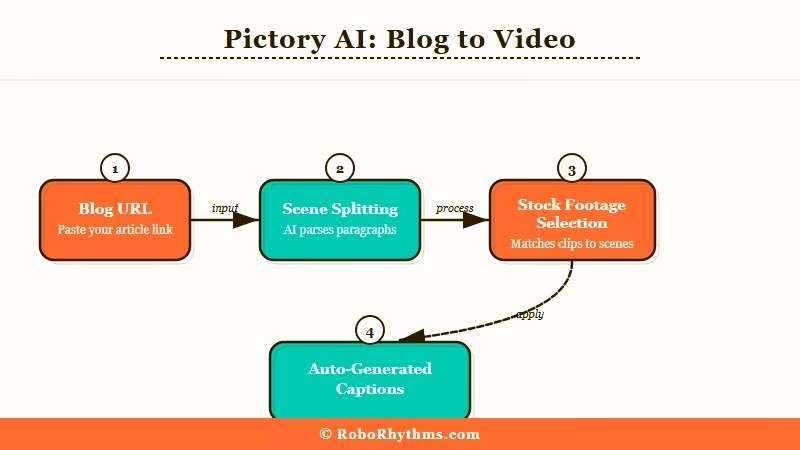
The blog-to-video feature is the standout. Paste a URL from any website, and Pictory scrapes the content, splits it into scenes, and assembles a draft video in about two minutes.
The stock footage selection is not always perfect, but it is usually close enough that you are editing one or two scene substitutions rather than building from scratch.
The transcript-based editing for long video clips is the other strong feature. You edit text, the video edits itself. Delete a paragraph from the transcript, the corresponding video clip disappears.
For podcast repurposing or webinar highlights, this cuts what would be 2 to 3 hours of manual editing down to 30 minutes.
Captions are accurate for English and sync well. The auto-generated captions are the best reason I would recommend Pictory over building a manual workflow with standalone tools.
From what I have tested, they require minimal correction on clean audio.
According to G2’s 2026 ratings, Pictory scores 4.4 out of 5 across hundreds of verified reviews, with ease of use consistently rated as its highest performing dimension.
What Pictory AI Does Badly
Pictory AI struggles with editing speed, non-English languages, voice naturalness, and stability under heavy use.
The editing experience is clunky once you get past the initial assembly. Previews can take 30 seconds or more to load after a simple scene change.
For a tool positioned around speed, waiting half a minute to preview a two-second edit kills the workflow advantage you gained in generation.
Voice quality is the most honest limitation. The AI voices range from serviceable to robotic depending on which voice you pick. The higher-tier plans integrate with ElevenLabs for narration, which is a significant quality improvement, but it adds cost on top of an already paid subscription.
Non-English content is a real problem. Users have documented that auto-subtitles in Spanish, Hindi, Russian, and similar languages require extensive manual correction. If your audience is primarily non-English, Pictory is not the right tool.
Random crashes and glitches appear in user reviews across G2, Cybernews, and direct forum reports with enough frequency that I would not rely on Pictory for deadline-critical work without a buffer day. The support team response time is slow, with no live chat available.
- Preview loading takes 30+ seconds after most edits
- Non-English subtitles require near-complete manual correction
- AI voice quality varies widely and the best voices require ElevenLabs add-on
- Customer support is email-only with slow turnaround
- No AI avatar presenter feature (Synthesia’s core differentiator)
Pictory AI vs Competitors
Pictory AI wins on text-to-video speed and blog repurposing. It loses on avatar presenters, creative control, and multilingual accuracy.
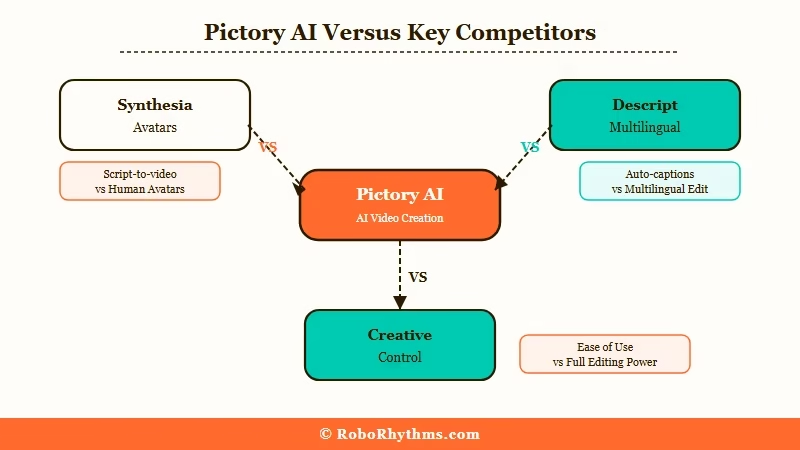
| Feature | Pictory AI | Synthesia | Descript |
|---|---|---|---|
| Text-to-video from URL | Yes | No | No |
| AI avatar presenter | No | Yes | No |
| Transcript-based editing | Yes | No | Yes |
| Non-English accuracy | Poor | Good | Good |
| Starting price | $25/mo | $22/mo | $12/mo |
| Best for | Blog/script repurposing | Corporate explainer videos | Podcast and interview editing |
Descript is the better pick if your primary use case is interview or podcast editing. Synthesia is the right choice if you need a human-presenter format without actual filming. Pictory occupies the text-and-stock-media repurposing lane and does that specific thing better than either of them.
For AI video tools in the automation and content workflow space, Make.com connects Pictory’s API (available on the Team plan) to broader content workflows, which matters if you are processing high volumes of blog posts.
Verdict: Who Should Buy Pictory AI and Who Should Skip It
Pictory AI is a strong buy for content marketers, bloggers, and online course creators who need to repurpose written or recorded content into video at scale. It is the wrong choice for creative video production, multilingual content, or anyone who needs a human-presenter format.
The use case it solves is real. If you have a blog with 100 posts and want to turn each into a short video, Pictory is the fastest path. The $21/month Professional annual plan is a reasonable cost for what it delivers in that scenario.
The honest version of the verdict: do not buy it if you are imagining it will handle the full production stack. It will not. It is a repurposing engine, not a video production suite.
If the use case fits, the free trial with three full projects is enough to know within an hour whether it will work for your workflow.
Quick Takeaways
- Pictory AI starts at $25/month with annual billing cutting it to roughly $15/month on the Starter plan
- Best feature: blog URL or script-to-video assembly in under 2 minutes with auto-selected stock footage and captions
- Biggest weakness: slow preview loading (30+ seconds), poor non-English subtitle accuracy, robotic voice quality on base plans
- No AI avatar presenter feature; for that, Synthesia is the competitor to compare
- Free trial gives 3 full watermarked projects, enough to evaluate the core workflow before paying
