
TL;DR: OpenClaw has no built-in circuit breaker. When a tool call fails silently, the agent retries indefinitely until the context window fills or the API bill does. Five config changes stop this: max_iterations cap, per-tool timeouts, SOUL.md error handling instructions, a watchdog cron for background agents, and tool quarantine for repeat offenders.
Someone in r/openclaw described watching their agent run the same web search 47 times before they killed the process. The total cost was $12 for one session. Nothing complex was running.
The agent hit a rate-limited endpoint, got an ambiguous response, could not tell it had failed, and so it tried again. And again. This is what happens when an OpenClaw agent keeps looping with no stop condition in place.
This is not a fringe case. An open bug report on the official OpenClaw GitHub repository confirms the core problem: the agent’s retry logic has no hard limit, and by the time you check in two hours later, it may have made hundreds of identical requests to the same broken endpoint.
The issue has been open for months. There is no built-in circuit breaker in the default config.
What makes it expensive is that silent failures are the most common trigger. A rate-limited API that returns HTTP 200 with an error in the body, a scraper that returns an empty string instead of throwing an exception, a cached result that looks like progress. The agent reads all of it as permission to continue.
The good news is that any one of the five fixes below would have stopped that $12 session at under $1. All five take under 15 minutes to set up.
Here is what I’d add to every new OpenClaw setup before running a single background agent.

Why OpenClaw Agents Loop With No Built-In Stop
OpenClaw agents loop because the default agentic loop has no circuit breaker: failed tool calls return ambiguous results that the agent treats as a cue to retry, not a signal to stop.
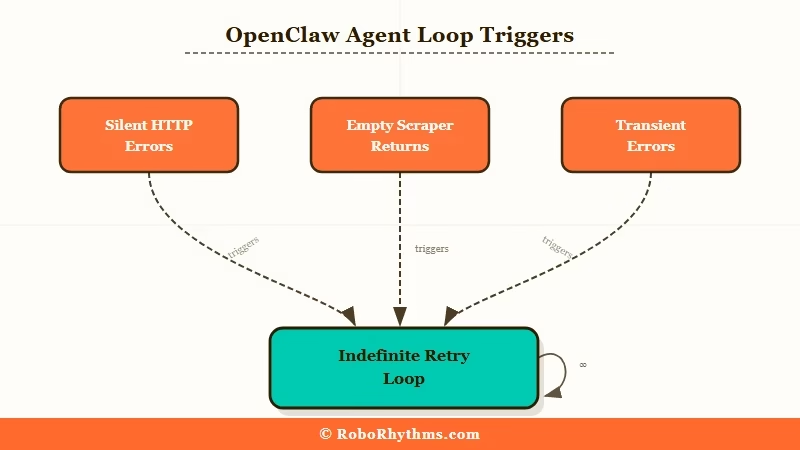
From my experience reading through the codebase and community reports, the loop mechanic becomes obvious once you see it. When the agent runner calls a tool, it passes the result back to the model as context and asks what to do next.
If the result looks like partial data rather than a clean failure, the model infers it should try again with slightly different parameters. The OpenClaw pipeline breakdown covers how context stacks at each stage of this loop, which also explains why a looping agent burns through tokens so fast; each retry cycle carries the full history of all previous retries.
According to Oracle’s developer documentation, agents consume roughly 4x more tokens than standard chat interactions in normal operation. In a retry loop, that multiplier compounds on every cycle.
There are three failure patterns that trigger loops most often:
- Silent HTTP errors: the tool call returns HTTP 200 but the payload signals failure; the agent does not treat this as an error
- Empty or ambiguous results: a scraper returns an empty string; the agent infers the page had no content and retries with a different URL
- Transient errors treated as recoverable: a rate limit or timeout gets retried at full speed rather than backed off
The fix for all three is the same: give the agent a cap, and give it explicit instructions for what to do when it hits that cap.
Set max_iterations in Your Config Right Now
max_iterations is the single most important loop protection in OpenClaw, and it is not enabled by default.
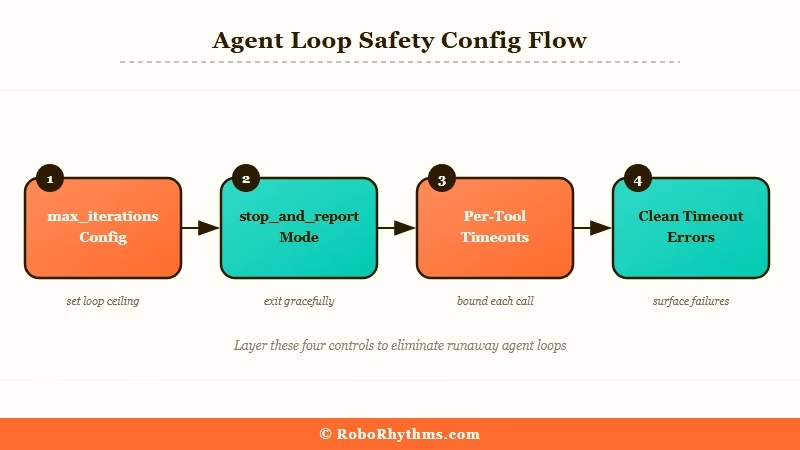
From what I’ve seen across the community, this one change prevents the majority of runaway sessions. Adding it takes 30 seconds. Here is the exact entry:
{ "agents": { "defaults": { "max_iterations": 15, "on_maxiterations": "stop_andreport" } } }The
onmaxiterationsvalue controls what happens at the cap. Options arestopandreport(surfaces what the agent was doing and stops),escalatetouser(sends a message asking for guidance), andabort(hard stop, no output). For personal setups I’d useescalatetouser; you get a message instead of a silent termination.
Before / After:
Before: Agent loops indefinitely on a failing API call. After 47 retries, cost $12, no output, session killed manually.
After: Agent hits iteration 15, outputs “I attempted this task 15 times and received inconsistent results. The endpoint may be rate-limited. Here is what I found so far,” then stops. Cost: $0.80.
Here is how I’d set limits by agent type:
Agent type Recommended max_iterations onmaxiterations Personal assistant (cron tasks) 5-8 escalatetouser Research agent (web, multi-step) 12-18 stopandreport Code agent (file ops, debugging) 15-25 stopandreport Background automation 5-10 abort Per-Tool Timeouts Block Silent Failure Spirals
Per-tool timeouts are the second line of defence: they force a clean error message when a tool call hangs, replacing the ambiguous result that triggers retries.
The problem with relying only on max_iterations is that a tool call can return something without that something being useful. A timeout produces a clean “timed out after 30s” error, which the agent can handle correctly, rather than treating an empty or partial result as an invitation to continue.
Add this to your config:{ "tools": { "web_search": { "timeout_seconds": 30, "max_retries": 2 }, "web_fetch": { "timeout_seconds": 45, "max_retries": 1 }, "bash": { "timeout_seconds": 60, "max_retries": 0 } } }The
max_retriesat the tool level handles transient failures like a brief network blip. In my experience, settingmax_retries: 0on bash commands is the right call: a bash command that fails should fail once, return a clear error, and let the agent decide what to do, not silently retry before the agent even knows what happened.The OpenClaw cost guide explains why per-tool config changes have compounding impact: every tool call in every session is affected, so getting these right once pays off across the lifetime of the setup.
Three SOUL.md Lines That Prevent Loops Entirely
SOUL.md error handling is the most effective loop prevention because it changes how the model reasons about failure, not just how many times it is allowed to try.
What I’d add is three sentences. The model reads SOUL.md on every session and treats these as operating rules.
One community member reported zero loops for three months after adding similar instructions.
Here are the exact lines:
Vague (do not use this): “Handle errors gracefully.”
Specific (paste this into SOUL.md):
If a tool call fails or returns an unexpected result twice in a row, stop retrying and report what happened. If you have tried more than three approaches to complete a single step without success, ask me for guidance rather than continuing. When a web request returns an empty result or a result identical to a previous failed attempt, treat it as a failure and move on to the next step.
The config-level limits are a safety net. The SOUL.md instructions are the first line of defence because they give the model a mental model for when to stop trying, rather than relying on a hard cap to catch the loop after it has already started.
For more on how SOUL.md shapes agent behaviour from the start, the hype vs reality guide covers SOUL.md setup as one of the week-one lessons most people learn the hard way.
The Watchdog Cron Pattern for Background Agents
A watchdog cron is the right pattern for any agent running unattended: a separate process monitors iteration count and kills sessions that exceed a threshold, independent of the agent itself.
What I’ve found is that config limits stop a loop at 15 iterations per session, but a background agent running overnight may start many sessions. A watchdog catches the pattern across sessions. Here is a minimal implementation:
#!/bin/bash
watchdog.sh - add to crontab: /5  * /path/to/watchdog.sh
AGENT_LOG="/var/log/openclaw/agent.log" THRESHOLD=10
RECENTCALLS=$(grep -c "Tool call:" "$AGENTLOG" | tail -n 300)
if [ "$RECENT_CALLS" -gt "$THRESHOLD" ]; then echo "Watchdog: $RECENT_CALLS tool calls detected, killing session" openclaw session kill --current openclaw notify "Watchdog triggered: agent stopped after $RECENT_CALLS rapid tool calls" fi
Add to crontab with /5 * /path/to/watchdog.sh. The threshold of 10 calls in 5 minutes is conservative; adjust it based on your agent’s normal task volume.
ClawTrust handles watchdog monitoring at the infrastructure level as part of managed OpenClaw hosting. For users who do not want to maintain their own monitoring scripts, managed hosting removes this entire category of operational overhead.
When to Isolate a Tool Instead of Patching the Loop
Tool isolation is the right response when a specific tool is the repeated failure point: remove it, verify it works independently, then re-add it with correct configuration.
Sometimes a loop signals that one tool is consistently broken rather than a config problem. If the same tool appears in the first failure message every time, another config tweak will not fix it. The correct move is quarantine.
Here is the process:
- Check the agent logs to identify which tool triggered the first failure
- Remove that tool from the agent’s tool list in the config temporarily
- Run the tool directly with a test call to confirm whether it works
- If the tool is broken, fix the underlying issue: expired API key, changed endpoint, missing dependency
- If the tool works in isolation, the problem is in how the agent calls it; add an explicit usage instruction to SOUL.md
- Re-add the tool to the config once verified
This matters most for ClawHub skills with their own tool definitions. If looping started after installing a new skill, that skill is almost certainly the culprit.
What I’ve seen most often is that removing it from the config and re-adding it with a usage instruction in SOUL.md resolves the loop entirely.
The broader skill vetting problem and what it costs is covered in the OpenClaw cost guide.
Frequently Asked Questions
The most common questions about OpenClaw agent loops cover detection, config options, and how loop types differ.
Why does my OpenClaw agent keep repeating the same tool call?
The agent is not detecting that the call failed. Either the error response looks like partial success, or the agent has no instruction to stop on repeated failures. Add max_iterations to your config and the three SOUL.md lines above. Either one stops most loops immediately.
How do I know if my agent is looping right now?
Run openclaw session_status to see the current iteration count and last tool call. If the same tool name appears more than twice in a row, the agent is in a loop. Use openclaw session kill --current to terminate it, then check the logs for which tool triggered the loop.
Does the /new command stop a looping agent?
No. /new starts a new session but leaves the existing session running in the background. Use openclaw session kill to terminate an active loop. /new resets the conversation context but does not stop background processes.
What is the difference between maxiterations and maxretries?
maxiterations caps the total number of tool calls in an agent session. maxretries, set per tool, controls how many times a single tool call can retry before returning an error. Both are needed: maxretries handles transient tool failures; maxiterations handles the larger loop pattern.
Can a ClawHub skill cause an agent to loop?
Yes. A skill with a broken tool definition or an overly frequent cron can trigger loop patterns. Run openclaw skills list --show-crons and quarantine any skill whose cron fired more than 50 times in the last hour.
Will setting max_iterations break agents that need many steps?
Setting it to 15-20 will not affect most tasks, which complete in under 10 iterations. For complex research tasks that need more steps, set 25-30 and use escalatetouser so the agent asks for guidance rather than aborting at the cap.
