
Quick Answer: Sider AI is worth it if you regularly switch between AI models during your workday. The sidebar drops GPT-4o, Claude, Gemini, and 20+ others directly into your browser, so you stop losing time across open tabs. The free plan has too many credit limits to rely on daily. Paid plans start at $4.20 per month. It’s cheap for what you get. Single-model users can skip it.
The first time I installed Sider AI, I expected it to feel like a gimmick. Another AI wrapper pretending to add value by slapping a sidebar on top of tools that already work fine on their own.
It is not that. Or at least, not entirely.
Sider AI is now the way I access most AI models while I work. No more switching tabs between ChatGPT, Claude.ai, and a Gemini window. I highlight text on any webpage, hit the Sider shortcut, and I’m already talking to whichever model fits the job.
That shift in workflow felt small until I realized how many interruptions it removed from my day.
This review covers what Sider does well, where it stumbles, what each pricing tier gives you, and who should probably use something else.

What Does Sider AI Do
Sider AI is a browser extension that puts a universal AI sidebar on every webpage you visit, giving you instant access to 20+ AI models including GPT-4o, Claude 3.5 Sonnet, and Gemini, without leaving the tab you’re in.
What is Sider AI: A browser sidebar extension with 5+ million weekly users that provides multi-model AI access, YouTube summaries, PDF chat, web page translation across 50+ languages, and a Deep Research Agent from any browser tab.
The core promise is simple: you should be able to ask an AI anything from wherever you are on the web, using whichever model makes sense, without interrupting what you’re doing.
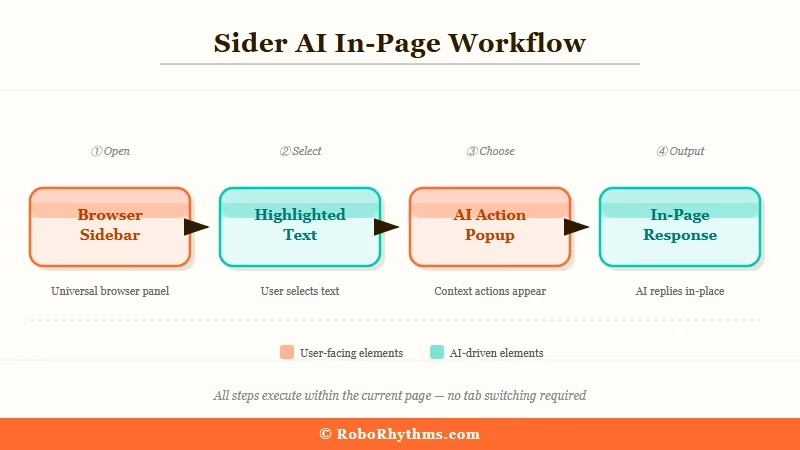
In practice, Sider does this through a handful of main features:
- Text highlight assist: Select any text on any page, and a Sider popup appears. You can ask the selected text to be explained, translated, summarized, rewritten, or sent as context into a new chat. This is the feature I use most.
- YouTube video summaries: Open any YouTube video, click the Sider icon, and you get a timestamped summary before committing to watching. Genuinely useful for long tutorials.
- PDF and file chat: Upload a document and chat with it. Sider handles multi-page PDFs and links, which is useful for research.
- Group AI chat: Ask the same question to multiple models simultaneously and compare their answers side by side. When I’m evaluating how different models handle a nuanced prompt, this cuts the testing time down considerably.
- Deep Research Agent: Scans more than 100 sources and returns a cited report on any topic. This one is slower but the output quality matches what I’d expect from a dedicated research tool.
- Web page translation: Translate entire pages into 50+ languages, including video subtitles on YouTube. The translation quality in my tests was solid, noticeably better than Google Translate on technical content.
What Sider does not do: organize your conversation history, let you create folders, offer advanced search across past chats, or export conversations in bulk.
If you want a proper AI knowledge base with organization, Sider is not the right tool. Look at something like NotebookLM for structured research work.
Sider AI Pricing Plans 2026
Sider AI’s pricing is genuinely affordable, with five tiers ranging from a free plan to an unlimited option at $16.70 per month (billed annually).
| Plan | Monthly Price (Annual) | Credit Allowance | Best For |
|---|---|---|---|
| Free | $0 | 30 basic credits/day | Testing only; expect to hit the limit before lunch |
| Starter | $4.20/mo | Monthly credit pool | Occasional users, light daily tasks |
| Basic | $6.70/mo | Larger monthly pool | Regular daily use across a few features |
| Pro | $12.40/mo | High monthly pool, premium model access | Power users who switch models frequently |
| Unlimited | $16.70/mo | Unlimited basic queries, large premium pool | Heavy daily users who cannot risk hitting limits |
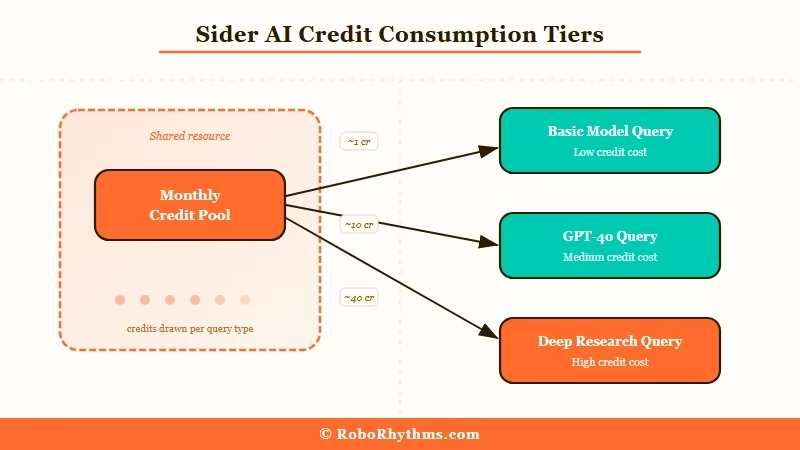
The credit system is worth understanding before you subscribe. Different models consume different amounts of credits per query. A simple task on a basic model costs one credit.
Running a Deep Research query or asking GPT-4o costs significantly more. Unused credits do not roll over at the end of the month, which I find frustrating.
You end up either over-buying to feel safe or under-buying and hitting walls at the wrong moment.
My honest take on tiers: the Starter plan at $4.20 is fine if you use Sider for quick text highlights and occasional YouTube summaries. The Pro plan is where serious daily users should be.
I would not recommend the free plan for anyone who wants to rely on Sider as a real workflow tool.
One thing worth noting: the pricing above is billed annually. Month-to-month pricing is higher.
If you are testing the water, the free plan works fine for a week to see if the sidebar habit sticks before committing to annual.
Sider AI Features Worth Your Time
The features that make Sider AI genuinely useful are the ones that save you from switching contexts, not the ones that replicate what native apps already do well.
The Text Highlight Feature Is the One You’ll Use Every Day
Highlight any chunk of text on any page and a small popup appears. You can ask Sider to explain the selected text, translate it, improve it, summarize it, or send it directly into a new chat with your model of choice.
This sounds minor. In practice, it changes how you read on the web.
Before Sider: You find a dense paragraph about a topic you’re researching. You copy it, open ChatGPT in a new tab, paste it, type your question, wait for the response, then return to the original page. That’s five context switches.
After Sider: Highlight the paragraph, hit the Sider shortcut, ask your question. You never leave the page.
Group AI Chat Saves Time When Comparing Models
The group chat feature is one I did not expect to use as much as I do. You type one prompt and send it to multiple models at the same time, then read their responses side by side.
When I’m testing different approaches to a prompt or want to see how Claude and GPT-4o differ on a nuanced question, this cuts comparison time from 20 minutes to 3.
YouTube Summaries Work Better Than You’d Expect
I use this every day for tutorial videos and conference talks. The summary quality is good enough that I can decide in 30 seconds whether the full video is worth my time.
Sider also provides timestamps in the summary, so if I do watch the video, I know exactly which segment has the part I care about.
For anyone who consumes a lot of video content for research or learning, this feature alone partially justifies the subscription, especially when you pair it with Sider’s translation capability for non-English content.
Deep Research Is Powerful but Slow
The Deep Research Agent is the feature I use least often, but when I need it, it delivers. You ask a question, it scans more than 100 sources, and it returns a structured report with citations.
The output is closer to a proper research brief than a chatbot response.
The downside: it takes several minutes. It also costs more credits than a standard query. I use it for specific research tasks where source diversity matters, not for quick answers.
Sider AI Pros and Cons
Sider AI’s strengths outweigh its limitations for multi-model users, though the organizational gaps are real enough to matter for some workflows.
What Sider Gets Right
- Access to 20+ models from one interface. GPT-4o, Claude 3.5 Sonnet, Gemini, and more, all available without a separate subscription to each native app.
- The sidebar integrates with every website. It works on any page, including sites you visit that normally have nothing to do with AI tools.
- Translation quality is excellent. Sider’s 50+ language translation, including video subtitles, consistently outperformed browser-native options in my tests.
- Group AI chat is genuinely unique. No other tool I’ve found lets you compare model responses at this speed without copy-pasting manually.
- Stability. In months of use, I had zero crashes, zero bugs that disrupted work. This matters more than it sounds; many browser extensions are notoriously flaky.
- Pricing is competitive. At $4.20 to $16.70 per month, Sider costs less than a single native subscription to most premium AI tools it includes access to.
Where Sider Falls Short
- No conversation organization. Every conversation is a flat list. No folders, no tags, no search that works across your history. If you generate a lot of chats, finding an old one is painful.
- Credits do not roll over. Unused monthly credits vanish. For anyone whose usage fluctuates, this feels like waste built into the pricing model.
- Free plan is too limited. 30 basic credits per day sounds reasonable until you realize a single multi-turn research conversation can burn through a large portion of them.
- Premium model queries cost significantly more credits. Using GPT-4o or Claude Opus on the lower tiers burns through your pool faster than you might expect. Watch which model you default to on lower-tier plans.
- No bulk export. You cannot download your chat history in any organized format. For anyone building a knowledge base from AI conversations, this is a real limitation.
- Deep Research is slow. Multi-minute generation times on a feature that costs extra credits can be frustrating when you want fast answers.
Who Is Sider AI Best For
Sider AI is the right tool for people who use multiple AI models daily and want them accessible from wherever they already work on the web, not just from dedicated AI apps.
| User type | Should use Sider? | Why |
|---|---|---|
| Multi-model power user | Yes | Cuts tab-switching, group chat feature alone saves hours |
| Researcher or analyst | Yes, with caveats | Deep Research and PDF chat are strong; lack of organization is a real limitation |
| Student or casual user | Maybe | YouTube summaries and text highlight are great; free plan may be enough |
| Content creator | Yes | Translation, summarization, and multi-model access all apply |
| Single-model loyalist | No | You get more from ChatGPT Plus or Claude Pro direct than from Sider’s credits |
| Team user | No | Sider is single-user; no collaboration features |
If you spend most of your AI time in one native app and you are happy there, Sider does not add much.
The tool earns its cost when you’re the kind of person who currently has three AI tabs open and wants them collapsed into one. You can start with the Sider AI free trial here to test the sidebar habit before committing.
For users who want to pair Sider with a more structured research workflow, I’d also recommend looking at free AI tools for content creation.
Sider fills the “in-browser research” layer, but it works best alongside dedicated tools for specific tasks.
The Sider AI Verdict
Sider AI is worth paying for if you regularly use more than one AI model and find yourself losing time to tab switching.
The sidebar habit takes about a day to form, and once it’s there, the workflow improvement is real.
The pricing is fair. Even the Pro plan at $12.40 per month is less than what most people pay for a single native AI subscription. The translation quality and YouTube summaries deliver immediate value.
The group AI chat is a feature you will not find elsewhere at this price point.
The parts that hold it back: no conversation organization, rolling credit expiry, and a free plan that does not give you enough to honestly evaluate the tool.
The free plan might work for light users, but I think the Starter tier at $4.20 is the real minimum to use Sider as a daily tool without frustration.
According to Statista’s AI tools market research, AI adoption for productivity tasks is growing fastest among knowledge workers who use multiple tools in their workflows.
Sider sits precisely in that gap: it does not replace any single native AI app, it replaces the friction between them.
My recommendation: try Sider AI, start on the free plan for a week, and if the sidebar habit sticks, move straight to Starter or Basic. Pro is worth it only if you regularly use premium models like GPT-4o or Claude Opus for complex tasks.
If you need a strong alternative for AI writing specifically, Blaze AI handles content generation with more structured output.
And if your goal is automated research at scale, the best paid AI tools worth keeping in 2026 are worth reviewing before you commit to any single subscription.
Frequently Asked Questions
Is Sider AI free to use?
Sider AI has a free plan limited to 30 basic credits per day. This covers light tasks like occasional text highlights and YouTube summaries, but it is not enough for regular daily use. Paid plans start at $4.20 per month billed annually.
What AI models does Sider AI include?
Sider AI gives you access to 20+ models including GPT-4o, Claude 3.5 Sonnet, Google Gemini, and others from one sidebar. The availability of specific models depends on your plan tier; higher tiers unlock more premium model queries per month.
Does Sider AI work on all websites?
Yes. Sider AI’s browser extension activates on any webpage you visit, including YouTube, Google Docs, and most productivity tools. The sidebar appears on every site automatically and can be toggled.
How does Sider AI compare to using ChatGPT directly?
ChatGPT is deeper for pure text generation and has better conversation history tools. Sider AI is broader, giving you multi-model access, YouTube summaries, PDF chat, and web-based text highlights from a sidebar. The two tools serve different needs.
Is Sider AI worth it for students?
Sider AI is a reasonable fit for students who research frequently online. The YouTube summary and text highlight features are the most useful for academic work. The free plan may be enough for lighter use; the Starter tier works well for daily study sessions.
What happens to unused Sider AI credits?
Unused credits expire at the end of each billing month and do not roll over. If your usage fluctuates month to month, factor this into which plan you choose. Over-provisioning means paying for credits you will not use.
