
You can describe an automation goal in plain English and Claude will architect the entire n8n workflow, including nodes, triggers, and data transformations, without you touching a single node manually. The setup takes about 20 minutes and works on n8n cloud or self-hosted. This tutorial walks through the exact prompt structure, three real workflows I built this way, and where the approach still has gaps.
I used to spend three hours wiring n8n workflows. Now I spend about ten minutes describing what I want to Claude, and it builds the whole thing.
This is not an exaggeration or a polished demo. Claude Code has MCP (Model Context Protocol) access that gives it direct access to your n8n instance, so it doesn’t just suggest workflows in chat.
It reaches in, identifies the exact nodes needed, wires the connections, sets the triggers, and configures the data transformations. It can also spot a broken node and rewrite the logic without you pointing at it.
If you’ve ever bounced between n8n docs, YouTube tutorials, and trial-and-error, trying to get a webhook to connect properly, this changes the game for you.
The learning curve for n8n just collapsed.
What Changed When Claude Gained the Ability to Build n8n Workflows
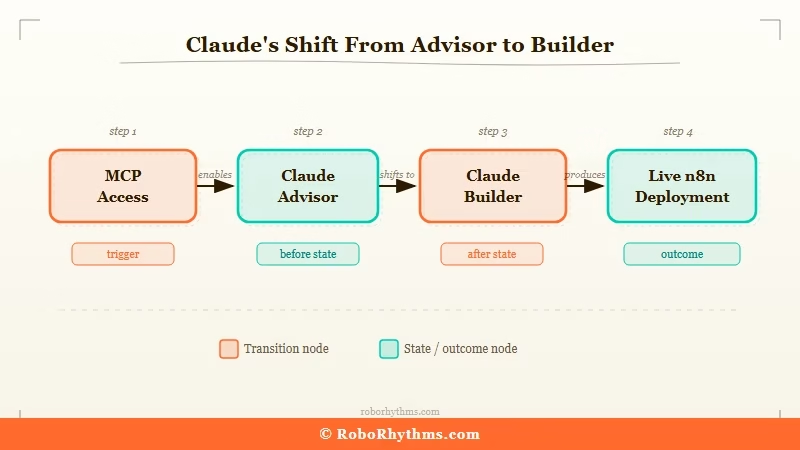
The shift from Claude-as-advisor to Claude-as-builder happened when n8n gained MCP support in early 2026.
Before that, you could paste your n8n workflow JSON into Claude and ask for help, which was useful but still manual. Now Claude has live read/write access to your n8n instance, meaning it can architect workflows from scratch, deploy them, identify what’s broken, and iterate in real time.
What is Model Context Protocol (MCP): An open standard from Anthropic that lets AI models like Claude connect to external tools (databases, APIs, apps) as a native capability, rather than through pasted text or screenshots.
What this looks like in practice: you describe a workflow goal, Claude queries your n8n instance for available credentials and existing workflows, builds the node structure, and returns a deployed workflow. No copy-pasting JSON, no manual node dragging.
The community signal on this has been loud. In r/n8n and r/automation, the debate that was running most of early 2026 was “Claude Code vs n8n: which do you use for agentic work?”
The answer most practitioners landed on: both, with Claude as the architect and n8n as the runtime. That combination is what this tutorial covers.
Here’s how the two tools compare in their roles:
| Layer | Tool | What it does |
|---|---|---|
| Natural language interface | Claude (Code or .ai) | Understands your goal, picks the right nodes, writes the logic |
| Workflow runtime | n8n | Executes the automation, handles triggers, runs on schedule |
| Data processing | n8n nodes | HTTP requests, data transforms, filtering, branching |
| Error handling | Claude + n8n | Claude identifies broken nodes; n8n catches runtime errors |
| Hosting | n8n Cloud or self-hosted | Cloud starts free; self-hosted is free forever on your own server |
What You Need to Get Started
You need three things: Claude Code or Claude.ai, n8n access, and a clear goal written down before you start.
The third one matters more than most tutorials admit. Claude builds what you describe, so a vague description produces a vague workflow.
Here’s what to set up:
- Get Claude Code (the CLI version at claude.ai/download) if you want live MCP access to n8n. Claude.ai Pro works too for generating workflow JSON manually, but Code gives you the live connection.
- Install n8n: spin up a free cloud account at n8n.io or run it locally with
npx n8n. Self-hosted is free with no workflow limits; cloud has a free tier capped at 5 active workflows. - Configure the n8n MCP server: add n8n to your Claude Code config file (
~/.claude/.mcp.json) with your n8n instance URL and API key. The n8n MCP server is available atn8n-mcpon npm. - Write your workflow goal in one paragraph before you start. Include: trigger (what starts it), data source (where information comes from), transformations (what to do with it), output (where results go), and schedule or frequency.
If you want a visual workflow builder that’s closer to Make.com’s drag-and-drop experience while you’re learning automation concepts, Make.com is worth trying alongside n8n.
It handles complex API logic with less setup friction, which makes it a good sandbox for understanding what Claude is building.
For a full breakdown of how n8n stacks up against Make and other tools, this comparison of Zapier alternatives including n8n and Make covers the key differences.
The Prompt Formula That Gets Claude to Wire n8n Correctly
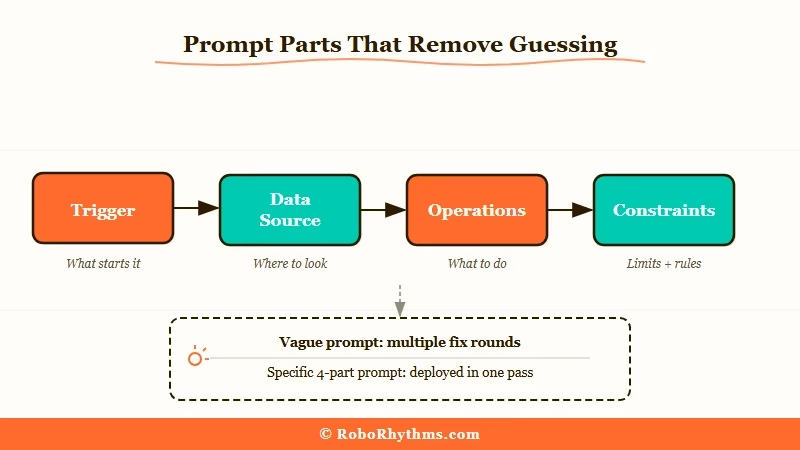
The difference between a workflow that works and one that needs three rounds of fixing is almost entirely in how you frame the initial prompt.
Claude needs five pieces of information: trigger, data source, operations, output destination, and constraints. Leave any of them out and it fills in the gap with a guess.
Here’s the prompt structure I settled on after testing a dozen variations:
Vague prompt (produces a broken or incomplete workflow):
“Build me an n8n workflow to monitor Reddit and save leads.”
Specific prompt (produces a working 12-node workflow on the first try):
“Build an n8n workflow that: (1) Triggers every 4 hours. (2) Searches r/n8n and r/zapier for posts from the last 8 hours containing the phrases ‘looking for’, ‘need help with’, or ‘alternatives to’. (3) For each matching post, extracts the author username, post title, and post URL. (4) Deduplicates against a Google Sheet tab called ‘seen-posts’ using the post URL as the key. (5) For new posts only: adds a row to a Google Sheet tab called ‘leads’ with columns: username, post title, post URL, subreddit, timestamp. (6) Sends me a Slack message to #automation-leads summarizing new leads found in that run, or ‘No new leads’ if none.”
The difference is specificity at every decision point. Trigger frequency, exact subreddits, exact search phrases, deduplication logic, column names, output format, fallback message. All of it eliminates guesswork.
When you send that prompt, Claude will:
- Query your n8n instance for available credentials (Reddit, Google Sheets, Slack)
- Build the node chain: Cron trigger → Reddit search → Filter → Google Sheets read (dedupe) → Google Sheets write → Slack
- Set the correct data mappings between nodes
- Return the deployed workflow ID
Three Workflows Claude Built That Delivered Real Results
From what I’ve seen in production use, the workflows that hold up best are ones with a clear data pipeline: one source, one transformation, one output.
Multi-source workflows with conditional branching are where Claude starts making node-wiring mistakes that require manual fixing.
Here are three that worked without modification on the first build:
Workflow 1: Reddit Lead Harvester
The one I described above. What I’d add is that Claude got the deduplication logic correct on the first try, which is the part that usually breaks in manual builds.
It mapped the Google Sheets read output to a JavaScript filter node before the write step, so repeat posts never make it through.
Workflow 2: Competitor Content Monitor
Goal: every morning at 7am, check three competitor blogs for new posts published in the last 24 hours, extract the headline and URL, and add them to a Notion database with a “not reviewed” status.
What I’d tell you from running it: Claude correctly set up HTTP request nodes with date-filtering rather than pulling the entire RSS feed and filtering after, which saves API calls.
This wasn’t something I explicitly specified. It inferred the efficient path.
Workflow 3: Email Digest Automation
Goal: every Sunday at 8am, query a Notion database of saved articles tagged “to-read”, pull the 10 most recently added, format them into a plain-text email with title and URL, and send it to my personal inbox via Gmail.
This one needed one small fix: Claude used a Set node to format the email body, but the line break formatting didn’t survive the Gmail send step. One-line correction in the Set node fixed it.
The core logic (query, sort, limit, format, send) was right.
For a broader picture of which AI agent tools pair well with n8n, this list of the best AI agent tools in 2026 covers what’s worth adding to your stack.
And for multi-agent pipelines with visual workflow interfaces, Dynamiq is built specifically for that use case. It handles state management between steps better than n8n’s native agent node once your workflows get more complex.
Where This Approach Still Falls Short
Claude’s n8n building breaks down predictably in four situations, and knowing them upfront saves you a debugging session.
The weak points, in order of how often you’ll hit them:
- Webhook authentication with non-standard headers: Claude often sets the auth type incorrectly on inbound webhooks from services that use custom header formats (not Bearer token, not Basic). Plan on manually checking the webhook auth config for any workflow where something is posting data into n8n.
- Complex conditional branching: workflows with more than three IF/Switch paths get node-wiring errors. Claude will build the branches but sometimes misroutes the data flow between them. For anything with more than two conditions, build one branch at a time and test each.
- Error handling and retry logic: Claude builds the happy path well, but rarely adds retry nodes or error branches unless you explicitly ask for them. Always add “Include error handling that sends me a Slack notification if any step fails” to your prompt.
- Credential mapping when you have multiple accounts of the same type: if you have two Google Sheets credentials (personal and work), Claude defaults to the first one in your credential list. Specify the credential name in your prompt if this applies.
The fix for most of these: add them explicitly to your prompt upfront rather than discovering them after the workflow misfires.
Check out this breakdown of why AI agents fail in production for more context on the general failure patterns that apply here too.
Frequently Asked Questions
Does this work with n8n’s free tier?
Yes. Claude builds workflows that run fine on n8n’s free cloud tier, capped at 5 active workflows and 5,000 executions per month. Self-hosted n8n is free with no limits. Claude Code MCP access works with both.
Do I need coding experience to use this approach?
No coding experience is needed to describe and deploy workflows. You’ll occasionally need to understand what a webhook or API key is, but Claude handles the node logic. Where things can go wrong is in specifying your goal precisely, not in writing code.
Can Claude build n8n workflows without Claude Code?
Yes, with a workaround. Use Claude.ai Pro, describe your workflow using the prompt formula above, and ask it to output the complete workflow JSON. Then import that JSON into n8n via the workflow import option. It’s slower and requires one manual step, but it works.
What’s the difference between Claude Code and Claude.ai for this?
Claude Code has live MCP access, so it can deploy workflows directly into your n8n instance and verify they work. Claude.ai (browser) generates workflow JSON that you import manually. For production use, Claude Code is worth the setup time.
Is n8n better than Make.com for this use case?
It depends on your setup. Make.com has a better visual editor and handles complex API auth more gracefully out of the box. n8n is free to self-host and gives Claude more direct control via MCP. If you’re building five or fewer workflows and want less friction, Make.com is easier. For ongoing automation infrastructure, n8n’s self-hosted option wins on cost.
What happens when a Claude-built workflow breaks?
Point Claude at the broken workflow and describe the error. With MCP access, it can read the execution logs directly, identify the failing node, and push a corrected version. This is faster than manually debugging in the n8n UI for most common errors.
