
Quick Answer: Janitor AI OOC commands are out-of-character instructions you send to the AI as yourself, not as your character. The three formats are:
OOC:prefix,(( ))double parentheses, and “ tags. Most failures happen because users send vague instructions mid-session with nothing anchoring them in the memory field. Set your behavioral ground rules in the memory field before the session starts, and mid-session OOC corrections become far more reliable.
OOC stands for Out Of Character. It is the mechanism Janitor AI gives you to step outside the roleplay and speak directly to the AI as yourself, not as your in-fiction character.
When it works, it is one of the most useful tools on the platform. When it fails, the AI keeps playing out the scene and ignoring you.
The frustration shows up constantly in Janitor AI communities. Users build a character setup, get into a session, and then hit a wall when the AI starts drifting from what they intended.
The OOC corrections go in, and nothing changes. Most of the time this is not a bug.
The issue is almost always one of three things: instructions are too vague, there is no pre-session memory setup anchoring the rules, or the user is hitting a platform content filter, and no OOC command will change that.
All three are fixable once you know which one you are dealing with.
This walkthrough covers the three OOC command formats, why they fail, and the workflow that makes them reliable.
For users who want an AI companion with fewer behavioral restrictions overall, SpicyChat AI is worth knowing about as an alternative with a different filtering approach.
What OOC Commands Are in Janitor AI
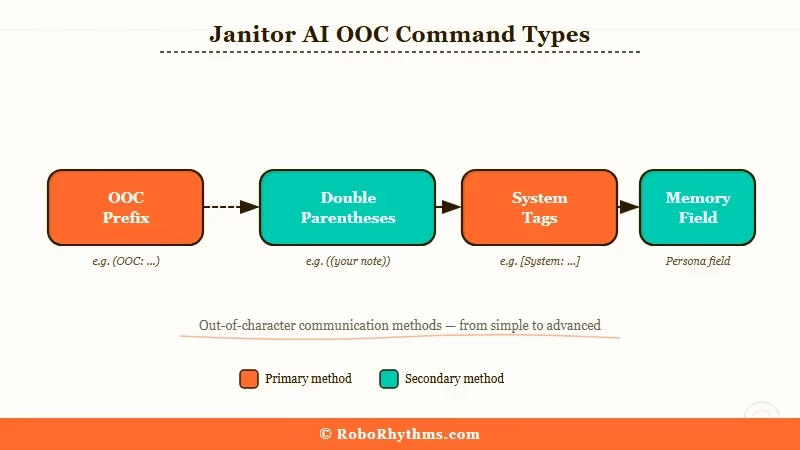
OOC commands in Janitor AI are out-of-character messages that let you send instructions to the AI as yourself rather than as your roleplay character, used to adjust behavior, correct drift, or set new rules without ending the session.
The term comes from roleplay convention. When you are in a session, every message is treated as character dialogue or narrative.
An OOC message signals the AI to exit the fiction frame and treat what follows as a real user instruction.
Janitor AI recognizes three OOC formats, each with different processing weight:
| Format | Syntax | Best Used For | Effective Priority |
|---|---|---|---|
| OOC prefix | OOC: [your instruction] | Quick mid-session corrections | Medium |
| Double parentheses | (( your instruction )) | Mid-scene clarifications | Medium |
| System tags | your instruction | Persistent behavioral rules | High |
| Memory field | Write rules before starting | Pre-session baseline | Highest |
The “ tag format carries the most weight because it targets how the model processes instruction priority, not just convention.
The OOC: prefix works because Janitor AI’s fine-tuning trains it to recognize out-of-character signals. Both work; the difference shows up in how persistent the effect is over a long session.
The memory field sits above all three. Writing your behavioral rules in the character’s memory field before the session starts means the AI has a high-weight baseline throughout, not just at the moment you send an OOC correction.
In my experience, users who set up the memory field skip most mid-session OOC corrections entirely because the AI already has the right instructions baked in.
What is the memory field: A pre-session configuration space in Janitor AI where you can write behavioral rules for the AI before a roleplay begins. Instructions here carry higher processing weight than messages sent during the session.
Why OOC Commands Break Down
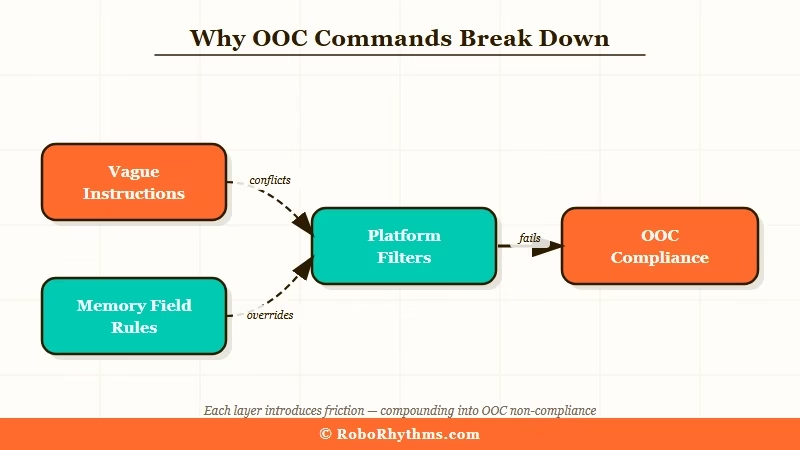
OOC commands break down in Janitor AI because in-conversation corrections compete with the model’s trained defaults and lose unless the instruction is specific, positive, and anchored by a memory field baseline.
The failure modes fall into three categories:
- The instruction is too vague.
OOC: behave bettergives the model nothing to shift to. The AI has no concrete behavioral target.OOC: Do not narrate my character's actions. Only [Character Name] acts and speaks.gives it an exact constraint to apply. Specific instructions consistently outperform general ones. - No memory field baseline. Mid-session OOC corrections are fighting against the model’s defaults in real-time context. Without a memory field entry that sets the session’s behavioral rules upfront, every OOC command is trying to override behavior the AI rebuilt from scratch. That is an uphill battle for every correction you send.
- Platform content filter, not a behavior issue. If the AI refuses certain content consistently regardless of how OOC instructions are framed, you are hitting a platform-level policy filter. No OOC command overrides that. The AI’s refusal is not a behavior that can be corrected mid-session.
One thing worth knowing: Janitor AI’s behavior shifted noticeably after model backend changes in late 2025. If OOC commands were working in a previous setup and stopped, that is likely the cause.
The “ tag format is the most stable across model updates because it works at the instruction weight level rather than relying on fine-tuning conventions that can shift between models.
For users who have found Janitor AI’s drift and OOC issues too inconsistent, CrushOn AI handles behavioral constraints differently at the character level and may fit your workflow better if OOC management on Janitor AI is becoming a recurring tax.
How to Use OOC Commands the Right Way
OOC commands work reliably in Janitor AI when you anchor behavioral rules in the memory field before starting, then use specific format instructions during the session to correct individual behaviors.
Here is the workflow I would recommend:
- Write OOC ground rules in the character’s memory field before the session. This is the highest-leverage step. Write your behavioral constraints in plain language before you start:
User does not want the AI to narrate their character's actions. Only [Character Name] acts and speaks. When user sends an OOC instruction, follow it immediately.The memory field carries higher processing weight than anything you send during the session. - Use the
OOC:prefix for low-stakes mid-session corrections. Behavioral nudges likeOOC: Less narration. Stay in dialogue.orOOC: Do not ask me questions. Continue the scene.work well for small corrections. You do not need the heavy-weight format for this. - Upgrade to “ tags for persistent changes that are not sticking. If the AI keeps reverting to the same behavior after two or three
OOC:corrections, switch to the system tag format. Use it for behavioral rules you need to hold across the rest of the session:
Do not describe any actions by [User's Character Name]. Only [AI Character Name] acts and speaks. The user controls their own character's actions entirely.- Use double parentheses for mid-scene editing without breaking flow.
((Take that from the top. Start with [Character Name] walking into the room.))or((Skip the intro. Start in the middle of the scene.))work well for production-style edits that keep the session moving without a hard stop. - Start a fresh session if drift is severe. If the AI has drifted far enough that corrections are not landing, a new session with a revised memory field is faster than trying to correct it in-context. The memory field is the real foundation. In-session OOC commands are adjustments on top of that baseline, not a substitute for it.
The concrete difference between a vague OOC instruction and one that works:
Vague:
OOC: stop acting weirdSpecific:
OOC: Do not break the fourth wall. Do not ask if I am comfortable with the scenario. Stay in character as [Character Name] and continue the dialogue from where we left off.
The specific version gives the model an exact behavioral change to make. The vague version leaves it guessing.
According to Anthropic’s system prompt documentation, system-level instructions carry higher priority in how language models process user interactions compared to turn-level messages.
That is the underlying reason “ tags consistently outperform in-conversation OOC prefixes for persistent behavioral rules, the same instruction weight principle applies across most modern AI models.
When OOC Commands Are Not the Problem
OOC commands are not the problem when Janitor AI is refusing content or exhibiting behavior that is governed by platform policy rather than session context, which no instruction format can override.
This distinction matters because it changes what you do next. If OOC corrections are not changing anything at all, run through this check first:
| Symptom | Likely Cause | What to Do |
|---|---|---|
| AI ignores OOC once, then continues | Vague instruction | Rewrite with specific behavioral target |
| AI follows OOC but reverts after 5-10 messages | No memory field baseline | Set rules in memory field before session |
AI follows OOC: but not consistently | Format has too little weight | Upgrade to “ tag format |
| AI refuses regardless of OOC format | Platform content filter | Not fixable via OOC; consider alternatives |
| OOC worked before, broke after update | Model backend change | Retry with “ tag format |
The most important boundary to understand: OOC commands modify behavior within the session context. They do not change what Janitor AI’s content policy permits across the platform.
If the AI consistently refuses something regardless of format, that refusal is a policy output, not a behavior pattern you can correct.
For users in that situation, the Janitor AI alternatives breakdown covers the main options if you are weighing whether to stay on the platform or move to one with different defaults.
Frequently Asked Questions
What does OOC mean in Janitor AI?
OOC stands for Out Of Character. It lets you communicate with the AI as yourself rather than as your roleplay character. Use the OOC: prefix, (( )) double parentheses, or “ tags depending on how long you need the instruction to hold.
Why are my OOC commands being ignored in Janitor AI?
Most ignored OOC commands are either too vague or fighting a session with no memory field baseline. Write behavioral rules in the memory field before starting. Use specific behavioral targets rather than general corrections like “stop that.”
Which OOC format works best in Janitor AI?
“ tags carry the highest processing weight and are most reliable for persistent rules. The OOC: prefix handles quick mid-session corrections. Double parentheses work well for mid-scene clarifications and light editing.
Can OOC commands override Janitor AI content filters?
No. OOC commands adjust behavior within session context but cannot override Janitor AI’s platform-level policy. If the AI consistently refuses content regardless of OOC format, you are hitting a filter, not a behavior you can correct.
What is the memory field and why does it matter for OOC?
The memory field is a pre-session configuration space where you can write behavioral rules for the AI. It carries higher processing weight than in-session messages, making it the most effective place to anchor OOC ground rules. Setting rules there before starting a session reduces how often you need mid-session corrections.
What should I do if OOC commands stopped working after a Janitor AI update?
Try switching from the OOC: prefix to “ tags. Model backend changes can affect how much weight the AI gives to different instruction conventions. The “ format is the most stable across updates because it targets instruction priority at a lower level.
