
Browser automation for AI agents in 2026 is more reliable than traditional web scraping. Scrapers return static HTML that breaks when sites update, struggle with login sessions, and feed agents incomplete page state. A browser layer gives your agent a live, fully-rendered environment to interact with, making it far less brittle to maintain in production.
I was running a pipeline that pulled pricing data from about a dozen supplier sites every morning. It worked well. For about three weeks.
Then one site updated its checkout flow, and the XPath selectors I had written stopped matching anything. Another started requiring a session cookie before showing prices.
A third served partial content while JavaScript finished loading, and my agent acted on whatever fragments it grabbed first. The pipeline that was supposed to save me four hours a week was eating four hours every time something broke.
That’s the trap with using traditional scraping for browser automation for AI agents: you’re not just fighting the websites, you’re fighting the agents too. A scraper returns raw HTML. An agent needs to understand state.
Once I started treating the browser itself as infrastructure, most of these problems stopped.
This is a walkthrough of that shift, what it looks like in code, and which tools are worth your time in 2026.
Imperva’s 2024 Bad Bot Report found that nearly half of all internet traffic now comes from bots, with sophisticated bot detection now standard on every consumer-facing site of meaningful size. Traditional scraping is exactly the pattern those defenses are tuned to block, which is why agent workflows built on it now collapse under conditions a browser-automation stack handles without flinching.
Traditional Web Scraping Breaks AI Agent Workflows
Traditional web scraping fails AI agent workflows because it returns a static HTML snapshot rather than the live, interactive page state an agent needs to act correctly.
Most scrapers work by fetching HTML at a URL and passing it upstream. That approach held up when most sites rendered server-side.
In 2026, the majority of content-heavy sites render client-side. The page your scraper returns is often a skeleton: `
` and a wall of JavaScript that was never executed. Your agent processes it confidently and produces garbage output.
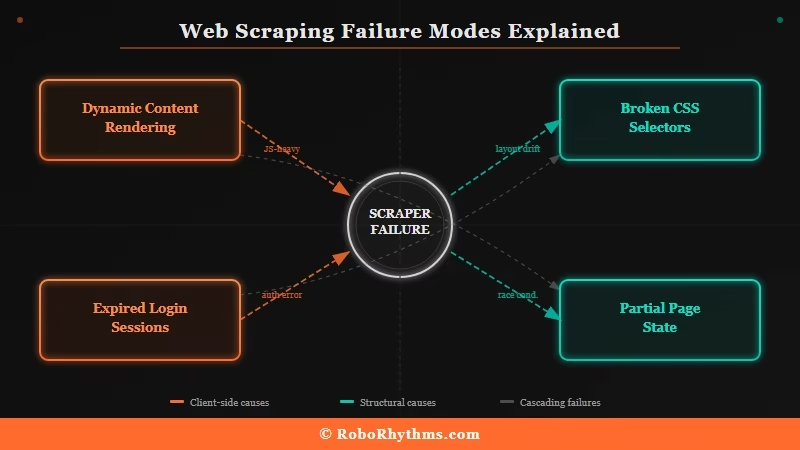
The problems I kept hitting, and what I consistently hear from other builders, fall into four categories:
- Dynamic content breaks silently. The scraper returns a 200 status with incomplete content. There is no error to catch. Your agent just works with the wrong data.
- Login sessions expire unpredictably. Sites set session cookies with short TTLs. Your scraper does not carry forward an authenticated session, so every new request looks like a new anonymous visitor.
- Selectors rot when sites update. When a site redesigns, your XPath or CSS selectors stop matching. Someone has to rewrite the extraction logic by hand.
- Partial page state causes bad decisions. If your agent acts before the page fully renders, it is working from an incomplete picture. I have seen agents click nonexistent buttons and submit forms that had not loaded yet.
According to benchmark research from Skyvern, AI-powered browser agents now achieve success rates above 85% on standardized web navigation tasks, compared to the near-constant manual patching that raw scraping requires.
That gap is what convinced me to switch.
What is a browser layer: A managed, programmatically controlled browser environment that gives AI agents a fully rendered, interactive web page to work with, rather than raw HTML output.
What Browser-as-Infrastructure Actually Means
Browser-as-infrastructure for AI agents means replacing your scraper with a real, running browser your agent can control and interact with, the same way a human would when they open a site in Chrome.
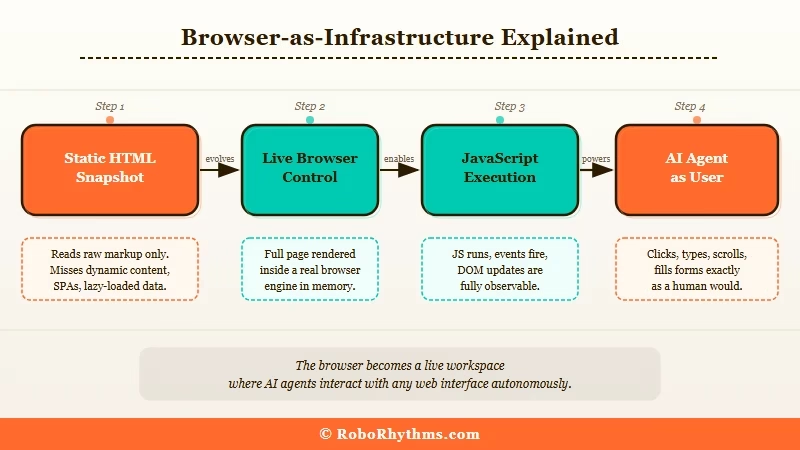
The mental model shift is worth spelling out. Instead of asking “give me the HTML from this URL,” you’re asking “open this URL in a live browser and give my agent access to whatever state it is in right now.”
The browser handles JavaScript execution, session cookies, anti-bot fingerprinting, and page rendering. Your agent gets a fully populated, interactive page.
What this solves in practice:
- Dynamic pages render completely before the agent touches them. No more fragments from JavaScript that never ran.
- Login sessions persist across requests because the browser maintains the same session context throughout.
- Page state is real. Your agent inspects what is visible and interactive on screen, not a guess extrapolated from source code.
- Maintenance drops significantly. When a site updates its layout, the agent reasons about what it sees rather than failing on a broken selector.
The builder whose post got me thinking about this put it well: instead of writing “scrape this page,” they started thinking “give the agent a stable, programmable browser environment.” That reframe is what makes the approach click.
The agent becomes a user, not a parser.
The real tradeoff is speed and cost. A scraper that returns HTML in 50ms will always beat a browser that needs to render and execute JavaScript first.
For tasks where you need volume at low latency, and the page structure is stable, raw scraping still has a place.
For tasks where your agent needs to understand and interact with real page state, the browser layer wins.
The Four Tools Worth Knowing for Agent Browser Automation in 2026
The best tools for browser automation for AI agents in 2026 are Browser Use, Skyvern, Browserbase, and Playwright paired with a headless management service.
Each fits a different use case, and picking the wrong one wastes a lot of setup time.
| Tool | Best For | Pricing | Key Stat |
|---|---|---|---|
| Browser Use | Python devs who want open-source control | Free (OSS); pay your own LLM costs | 89.1% WebVoyager success rate; 78k GitHub stars |
| Skyvern | No-code form-filling workflows | Free tier available | 85.8% on WebVoyager; best for form tasks |
| Browserbase | Teams scaling browser sessions in production | Usage-based | $40M Series B, June 2025; managed infra |
| Playwright + Hyperbrowser | Custom agent-browser interfaces | Playwright free; Hyperbrowser has paid tiers | Concurrency, proxies, and automation baked in |
From my testing, Browser Use is where most Python developers should start. It runs on top of Playwright, gives you an LLM-native API for controlling the browser, and the community around it is active enough that most edge cases are already documented.
Skyvern is the better choice for skipping code entirely, particularly for anything involving form submissions or multi-step workflows on sites without official APIs.
For teams running browser agents at scale, Browserbase is worth the infrastructure cost. It handles concurrent sessions, fingerprint management, and proxy rotation automatically, all of which is a significant amount of scaffolding to build from scratch.
I have seen references to it supporting over a million concurrent sessions without degradation, which puts it in a different league than self-managed headless Chromium.
RoboRhythms has a rundown of OpenClaw automation ideas if you want to see how these browser control concepts apply in a specific agentic setup, though the core principles carry across tools.
How to Set Up a Browser Layer for Your AI Agent Pipeline
Setting up a browser layer for AI agent automation takes three steps: install a browser control library, connect it to your LLM, and replace your scraper output with a live page interaction.
The setup I would recommend starting with uses Browser Use, since it is the most direct path from “I have a Python agent” to “my agent can use a real browser.”
Step 1: Install the dependencies
pip install browser-use playwright playwright install chromium <blockquote style="border-left:4px solid #FF6B2B;margin:12px 0;padding:8px 16px;background:#fff8f5;"><strong>Step 2: Replace your scraper with a browser agent task</strong>
Here is the concrete difference between the old approach and the new one for the same task:
Before (scraping approach):python import requests from bs4 import BeautifulSoup
url = "https://supplier.example.com/pricing" html = requests.get(url).text soup = BeautifulSoup(html, "html.parser") price = soup.find("span", class_="price-display").text
Breaks silently when the class name changes
After (browser automation approach):
from browser_use import Agent from langchain_openai import ChatOpenAI
agent = Agent( task="Go to supplier.example.com/pricing and return the current price for Product SKU-1042", llm=ChatOpenAI(model="gpt-4o"), ) result = agent.run()
The first snippet relies on me knowing the exact class name of the price element and that name staying stable.
The second gives the agent a goal in plain language and lets it navigate and extract the right information on its own. When the site updates, the scraper breaks. The browser agent reasons through the new layout.
Step 3: Add session persistence for authenticated sites
from browser_use import Agent, BrowserConfig from browser_use.browser.browser import Browser
browser = Browser(config=BrowserConfig( chromeinstancepath="/usr/bin/google-chrome", keep_open=True, ))
agent = Agent( task="Log into my-supplier.com with username=myuser and password from env var, then return my current order status", llm=ChatOpenAI(model="gpt-4o"), browser=browser, )
That is the core setup. From here, you can wire it to Make.com to trigger browser agent tasks on a schedule or based on external events without managing the orchestration layer yourself.
Make’s visual workflow builder handles the trigger logic so you can focus on the agent behavior, not the plumbing.
See also: how AI agents work and what automation agencies consistently get wrong if you want more context before committing to an architecture.
When Scraping Still Makes Sense
Raw web scraping still makes sense when you need high-volume, low-latency data from stable, server-rendered pages where the structure is unlikely to change and no authentication is required.
There are workflows where I still use scrapers. My decision framework, simplified:
| Situation | Use Scraping | Use Browser Automation |
|---|---|---|
| Static HTML pages, stable structure | Yes | No (overkill) |
| JavaScript-rendered pages | No | Yes |
| Authenticated sessions required | No | Yes |
| Agent needs to interact with the page | No | Yes |
| High volume, low latency, stable pages | Yes | No |
| Competitor pricing from frequently-updated sites | No | Yes |
Most production agent pipelines end up using both. Use raw scraping for low-complexity, high-volume tasks where a scraper will not break.
Use browser automation where the agent needs to reason about and interact with real page state. For teams building more complex systems with multiple specialized agents, Dynamiq gives you a framework for routing those tasks without reinventing the orchestration layer.
It is particularly useful once your pipeline grows past two or three distinct agent roles.
The voice agent deployment guide on RoboRhythms covers similar architecture decisions for multi-agent setups if that is the direction you are heading.
Frequently Asked Questions
What is browser automation for AI agents?
Browser automation for AI agents means giving your agent a live, programmatically controlled browser environment instead of raw HTML. The agent interacts with fully rendered pages, maintains login sessions, and reasons about real page state rather than static source code.
Is browser automation better than web scraping for AI agents?
For most agent workflows in 2026, yes. Browser automation handles JavaScript-rendered content, login sessions, and dynamic pages automatically. Scraping is faster and cheaper for high-volume static page tasks, but breaks far more often when sites update.
What are the best browser automation tools for AI agents in 2026?
Browser Use (Python, open-source, 89.1% benchmark success rate), Skyvern (no-code, best for forms), and Browserbase (managed infrastructure for scale) are the top options. Playwright paired with Hyperbrowser is also strong for custom setups.
How reliable is browser automation in production?
Leading frameworks reach 85-89% success rates on standardized benchmarks. For production, a hybrid approach works best: deterministic scripts for predictable steps and browser agents for dynamic navigation, balancing speed with reliability.
What are the security risks with AI browser agents?
Prompt injection is the main one. Research shows unmitigated agents fall for roughly 24% of indirect prompt injection attacks, where malicious content on a page redirects the agent instructions. Scope agent permissions tightly, use human-in-the-loop checkpoints for sensitive actions, and store credentials in encrypted vaults.
Does browser automation work on sites that block bots?
Most browser layers use real Chromium instances with standard fingerprints, which passes basic bot detection. Managed services like Browserbase include proxy rotation and fingerprint management for more aggressive setups. Check each site’s terms of service before automating access.
