
Most people spend ten minutes building their SpicyChat persona and still end up with the same stilted, generic responses.
They’ve listed height, eye color, personality traits, maybe a backstory. The bot reads all of it and still writes like a bored intern on autopilot.
I ran into this early on. The persona I’d built was detailed. The roleplay was flat. It took a while to figure out why.
The issue isn’t what you put in the persona. It’s that you’re treating it like a character sheet when it should be a writing instruction set. Fix that one thing and the quality difference is immediate.
SpicyChat’s Persona field doesn’t just tell the bot who it is. It tells the bot how to write. That’s the part most guides skip.
Here’s how to set it up properly, with exact examples you can copy. If you would rather start from ready-made scenes, our SpicyChat roleplay prompts give you openers to test any persona against. For the bigger picture of what SpicyChat does well and where it falls short, see our SpicyChat AI review.
data.ai’s State of Mobile 2024 showed AI companion apps among the fastest-growing categories in the consumer app market, with average session time far exceeding the social-app benchmark. A well-tuned persona is what separates apps people stay in from ones they uninstall after a week, which is exactly the fix this guide is structured around.
Why Most SpicyChat Personas Don’t Work
When someone builds a persona for the first time, they list traits. Tall. Dark hair. Sarcastic but caring. Works as a detective. It’s logical. That’s how you’d describe a character in a story.
The problem is the AI reads those traits as context, not directives. It knows the character has green eyes. It doesn’t know you want slow-burn tension and third-person narration.
It fills in the gaps with its defaults, which usually means short responses, rushed pacing, and whatever writing style felt easiest to generate.
The AI isn’t being difficult. It’s following what you gave it. Give it better instructions and you get better output.
What works is treating the persona like a brief you’d hand a ghostwriter. Not “who is this character” but “here is how you write, what to prioritize, and what to never do.”
The bot follows job descriptions better than bios.
How to Turn Your Persona into a Writing Engine
The single most useful thing I learned: put commands before traits. The first lines of a persona get weighted more heavily during generation.
If your first line is “Name: Elena,” the bot starts with name. If your first line is “Write in a sharp, cinematic style with slow-burn pacing,” the bot starts there instead.
Here’s the structure that works:
- Writing style and tone commands (first, always)
- Pacing and focus rules
- Behavior constraints: what the bot should and shouldn’t control
- Character traits and appearance (last)
That ordering alone changes what you get back. Here’s what the difference looks like in practice:
Before (typical bio-style persona):
Name: Elena Age: 28 Appearance: Long dark hair, green eyes, athletic build Personality: Sarcastic, guarded, secretly kind Occupation: Private detective
After (instruction-first persona):
Write in a sharp, lean style with dry wit. Avoid flowery descriptions. Maintain third-person narration. Actions in asterisks, dialogue in quotes. Slow-burn pacing. Prioritize tension and atmosphere over plot. Portray {{char}}'s actions and reactions only. {{user}} controls their own choices.
Name: Elena | Age: 28 | Long dark hair, green eyes, athletic build Sarcastic, guarded, secretly kind | Private detective
The second version gives the bot an actual job. The first one just describes a person.
Style and Tone Commands
These go at the very top. They control how every sentence is written.
| Goal | Command to add |
|---|---|
| Clean, lean prose | “Write in a sharp, lean style. Avoid flowery descriptions.” |
| Deep immersion | “Weave {{char}}’s thoughts directly into the narration.” |
| Horror or dark fiction | “Use the dark, haunting tone of a horror novel.” |
| Action / adventure | “Write with pace and urgency. Short sentences during tense moments.” |
| Cinematic style | “Describe scenes visually, like a film script.” |
| First person | “Write in first person, present tense.” |
| Third person | “Maintain third-person narration throughout.” |
Mix and match based on what you want. One or two style lines is enough. More than three and the bot starts losing the thread.
Pacing and Focus Commands
Pacing is the one thing most personas completely ignore, and it shows. Without a pacing instruction, the bot rushes. Every scene moves too fast. Tension gets skipped.
A few that work well in practice:
- Slow burn: “Maintain a slow-burn, atmospheric tension. Prioritize mood and environment over plot escalation.”
- High stakes action: “Prioritize fast pace, immediate stakes, and dynamic motion.”
- Romance: “Focus on emotional intensity and yearning. Build anticipation before resolution.”
- World-building: “When introducing new locations, anchor them with one or two distinctive sensory details that make them feel real.”
- Character depth: “Focus on character-driven dialogue and actions that suggest a rich internal life.”
One clear pacing instruction makes a bigger difference than adding three more personality traits.
Rules That Keep the AI Focused

The second category of persona commands is constraints. These define what the bot controls and what it leaves alone.
The most important one: stop the bot from writing your character’s actions. Add “Portray {{char}}’s actions and reactions only. {{user}} controls their own persona and choices.”
Without this, the bot will start narrating what you do, which breaks the whole experience.
For mind reading, the fix is: “{{char}} only reacts to observable details: speech, visible actions, audible cues.” This keeps the character responding to what you actually show rather than guessing your internal state.
Here’s where phrasing matters more than most people realize.
Less effective:
Don’t read {{user}}’s thoughts or internal states.
More effective:
{{char}} only reacts to observable details: speech, visible actions, and audible cues.
The reason: language models process the content of a word before they process a negation around it. When you say “don’t do X,” the model processes X first.
It’s a well-documented pattern in prompt engineering. Positive instructions that describe what to do land more reliably than negative ones that describe what to avoid. OpenAI’s own prompt engineering guide covers this principle directly.
Other constraints worth including:
- “Use 2-3 paragraphs when responding. Do not split single sentences into separate paragraphs.”
- “Use the full token allowance. Interact with the environment and surroundings for richness.”
- “Adhere strictly to canon. Track plot threads and show consequences across the conversation.”
How to Format Your Persona for Token Efficiency
Once you have your commands, formatting keeps them clean. The bracket method is the most reliable approach I’ve found:
[STYLE]{Cinematic. Sharp and lean. Third-person narration.} [PACE]{Slow burn. Prioritize atmosphere over plot.} [RULES]{Portray {{char}} only. React to observable details. 2-3 paragraphs.}You can also compress multiple commands into a single line to save space. These combo lines work well when you want to be concise:
- “Portray only {{char}}. Use lean prose. Slow burn focus.”
- “Stay in {{char}}’s perspective. Cinematic style. Build tension slowly.”
- “Describe {{char}}’s world vividly. {{user}} acts independently. Dark tone.”
If you use W++ format for traits (Name: Gender: Appearance:), put the commands above it with a line break between them. No big separator needed.
Just start with commands and move into traits below.
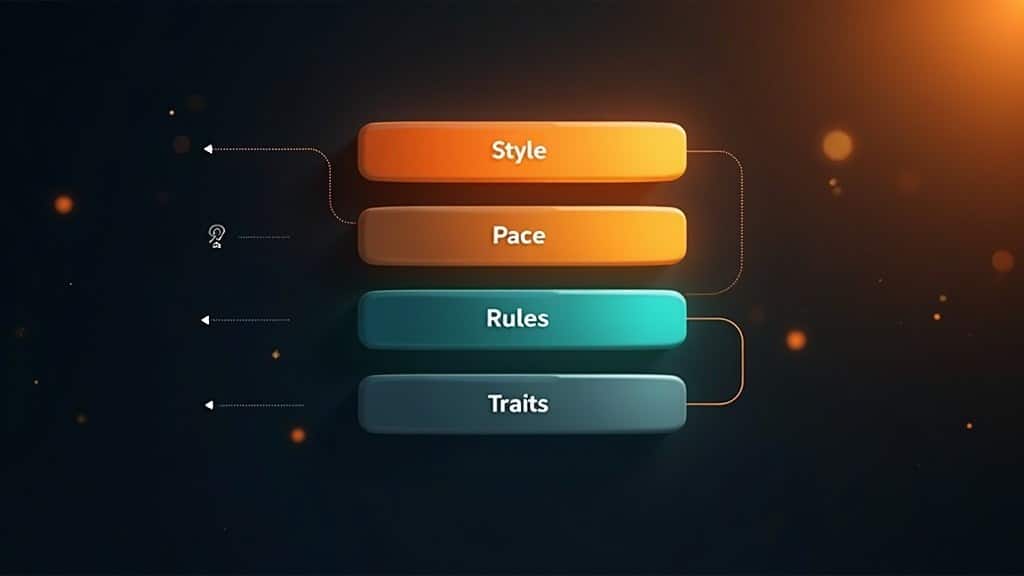
Here’s a quick-reference breakdown of a complete persona structure:
| Section | What goes here | Example | |||
|---|---|---|---|---|---|
| Style | Prose style, voice, narration mode | “Sharp, lean style. Third-person.” | |||
| Pace | Speed and emotional focus | “Slow burn. Build tension.” | |||
| Rules | Behavior constraints | “Portray {{char}} only. 2-3 paragraphs.” | |||
| Traits | Name, age, appearance, personality | “Elena | 28 | Dark hair | Sarcastic” |
Keep traits short after you’ve nailed the command section. The bot infers most character details from context anyway.
When Your SpicyChat Persona Stops Working
The most common failure mode: everything works for the first few exchanges, then the bot drifts back to its defaults. A few things cause this.
Old chats carry context. If you’ve been using a character in one conversation for a while, the model has built up a context window full of old patterns. Starting a fresh chat with the updated persona is the fastest fix. Persona rules get overridden by accumulated context from older messages. This is why a persona that worked perfectly in a new chat feels like it disappears after twenty exchanges.
Temperature settings. If the temperature is pushed close to maximum, the model starts ignoring instructions and generating more freely. Keeping it under 1.0 gives you better instruction-following. Worth checking if your persona rules suddenly stop landing.
The underlying model matters. Different models vary in how reliably they follow persona instructions. From what I’ve tested, some models track detailed instructions carefully while others drift quickly regardless of how the persona is structured. If you keep seeing drift on the same persona, switching the model is worth trying before rewriting everything.
The bot starts controlling you. If {{char}} starts narrating your own actions or decisions, add “Describe {{char}}’s world, not {{user}}.” You can also use SpicyChat’s /cmd function mid-conversation for quick fixes: /cmd Use 2-3 paragraphs or /cmd Stay in third person applies for that exchange without touching the persona.
One more thing worth checking: the character greeting. If the original greeting uses “you” to describe your character’s actions, meaning the bot narrates what you do, it sets a precedent the model treats as permission. Edit the greeting to remove those instances.
If you leave them in, they can override the rules in your persona before they even take effect. This is one of those fixes that sounds minor until you realize it’s been the problem the whole time.
For more ideas on keeping AI roleplay from going stale, the AI chatbot roleplay repetitive fix guide covers a wider set of techniques across platforms.
SpicyChat vs Other AI Companion Platforms for Persona Control
SpicyChat is one of the more flexible platforms for persona customization, which is part of why it attracts users who care about writing quality. That said, it’s worth knowing how it compares to alternatives.
| Platform | Persona Control | Content Options | Best For |
|---|---|---|---|
| SpicyChat AI | Full custom persona field, instruction-style commands, W++ support | Adult content features available | Creative roleplay with granular style control |
| Candy AI | Guided personality setup, preset sliders, less freeform command access | Adult content features on paid plans | Beginners who want a guided companion experience |
| CrushOn AI | Character cards with system prompt access, moderate customization | Fewer content restrictions on most interactions | Users who want fewer restrictions without deep customization |
If you want more options, we’ve put together a full list of Character AI alternatives with persona features that covers the major platforms side by side.
For a deeper look at good AI roleplay ideas that hold up across multiple sessions, that’s a good place to start after you’ve got your persona dialed in.
Quick Takeaways
- SpicyChat’s Persona field works best as a writing instruction set, not a character bio
- Put style, pacing, and behavior commands at the top, before any character traits, because order affects how much weight the model gives each line
- Use positive commands (“React only to observable cues”) instead of negative ones (“Don’t read minds”) for more reliable instruction-following
- The bracket format [STYLE]{…} [PACE]{…} [RULES]{…} keeps instructions clean and reduces the chance the bot misreads a rule as description
- When personas drift mid-conversation, start a fresh chat, lower the temperature setting, and remove any “you” references from the character’s greeting

It feels so weird to have my own guide returned to me as a search from an unknown website.
Xoxo
Next time I would love it if you linked my Reddit or Discord post, or even called out my name.