
Summary
- Age verification is the biggest cause of C.AI lockouts in 2026, and a failed check stays cached for 7 days.
- Login links expire after 15 minutes, so a slow inbox alone can break sign-in.
- “Sorry, you’re not eligible to use our services” hits plenty of adults, and reinstalling the app clears most cases.
- Cloudflare loops are usually one specific browser extension rather than a Character.AI fault.
- Password, Discord and Facebook logins were retired on July 30, 2024.
Most C.AI login guides still explain the 2024 switch to email links and Google sign-in. In 2026 that migration causes a shrinking share of lockouts, and the newer causes are the ones people get stuck on.
The most expensive of them is age verification. Character.AI runs age checks through a third party called Persona, and Persona keeps a failed selfie or ID on file for 7 days before deleting it.
Users who retry inside that window report being declined again automatically, which points at the cached rejection being matched rather than a fresh review. Either way, waiting out the full week after a reset is what gets people through.
Almost nobody mentions this, which is why people burn three or four attempts and conclude the account is gone. It is not gone, the queue is just holding a week-old photo of you.
C.AI Login Problems and Their Fixes at a Glance
Eight different problems produce the same “cannot log in” experience on C.AI, and a fix for one does nothing for the others, so identify the symptom before changing any settings.
| What you see | Most likely cause | First thing to try |
|---|---|---|
| “Verification currently unable” | Age check failed and Persona cached the attempt | File the age verification ticket, then wait 7 days |
| “Sorry, you’re not eligible to use our services” | Age gate, or an adult false positive | Reinstall the app, or use a private window with the VPN off |
| The login email never arrives | The link expires in 15 minutes, or it is an Apple relay address | Search mail for “character.ai”, check Spam, then link a standard address |
| Endless “verify you are human” loop | A browser extension is breaking the Cloudflare handshake | Disable UserAgent Switcher, Referrer Modifier, Canvas Blocker, CSS Reloaded |
| Cloudflare error 1102 | An outage, or a home IP with a poor reputation | Wait it out, or toggle airplane mode for 10 seconds |
| Logged out mid-chat, or redirect loops | Short session tokens plus stale beta-subdomain cookies | Clear site data from developer tools, then hard refresh |
| You get in, but bots and chats are missing | You are signed into a second account made by accident | Check Linked Accounts, and try the legacy site too |
| The old Discord or Facebook button does nothing | Those methods were retired on July 30, 2024 | Link a valid email on the legacy site, then sign in with it |
How to Log in to C.AI on Web
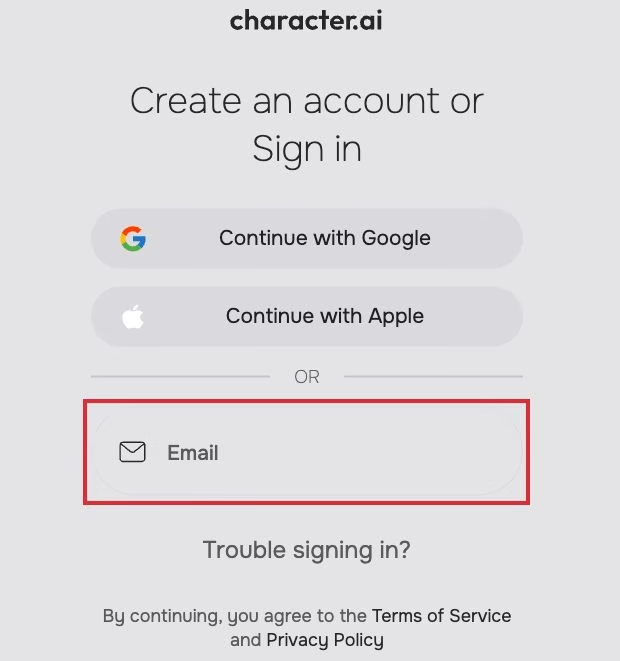
Character.AI now uses email verification links or trusted third-party providers like Google and Apple for signing in.

The goal is to simplify the process while strengthening account protection.
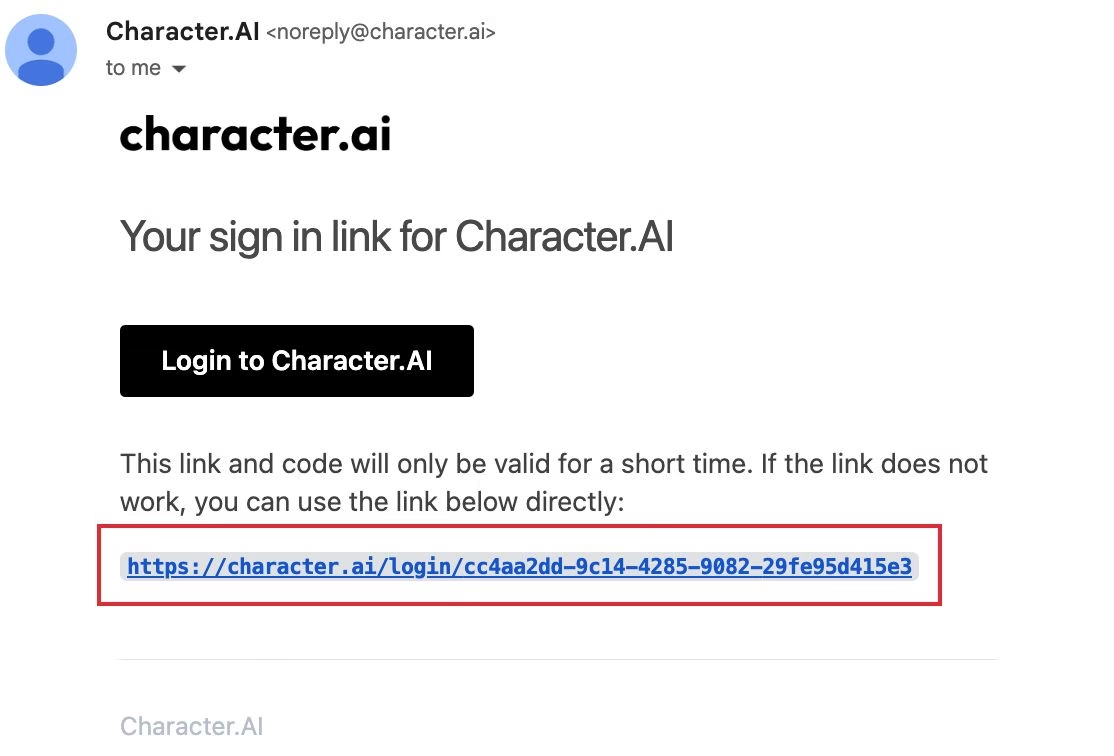
Follow these steps to log in through the website:
Visit the official page at https://character.ai.
Click Login at the top right.
Choose Continue with Google, Continue with Apple, or Continue with Email.
If you use the email option, a verification link will be sent to your inbox.
Open the email and click the link to complete login.
If you experience any issues, Character.AI recommends checking their support guide: https://support.character.ai/hc/en-us/articles/23628361893659-Trouble-logging-in-We-ve-Updated-our-Login-Process
You can also submit a support ticket at https://support.character.ai/hc/en-us
How to Log in to C.AI on Mobile
The process for Android and iOS users follows the same security update.
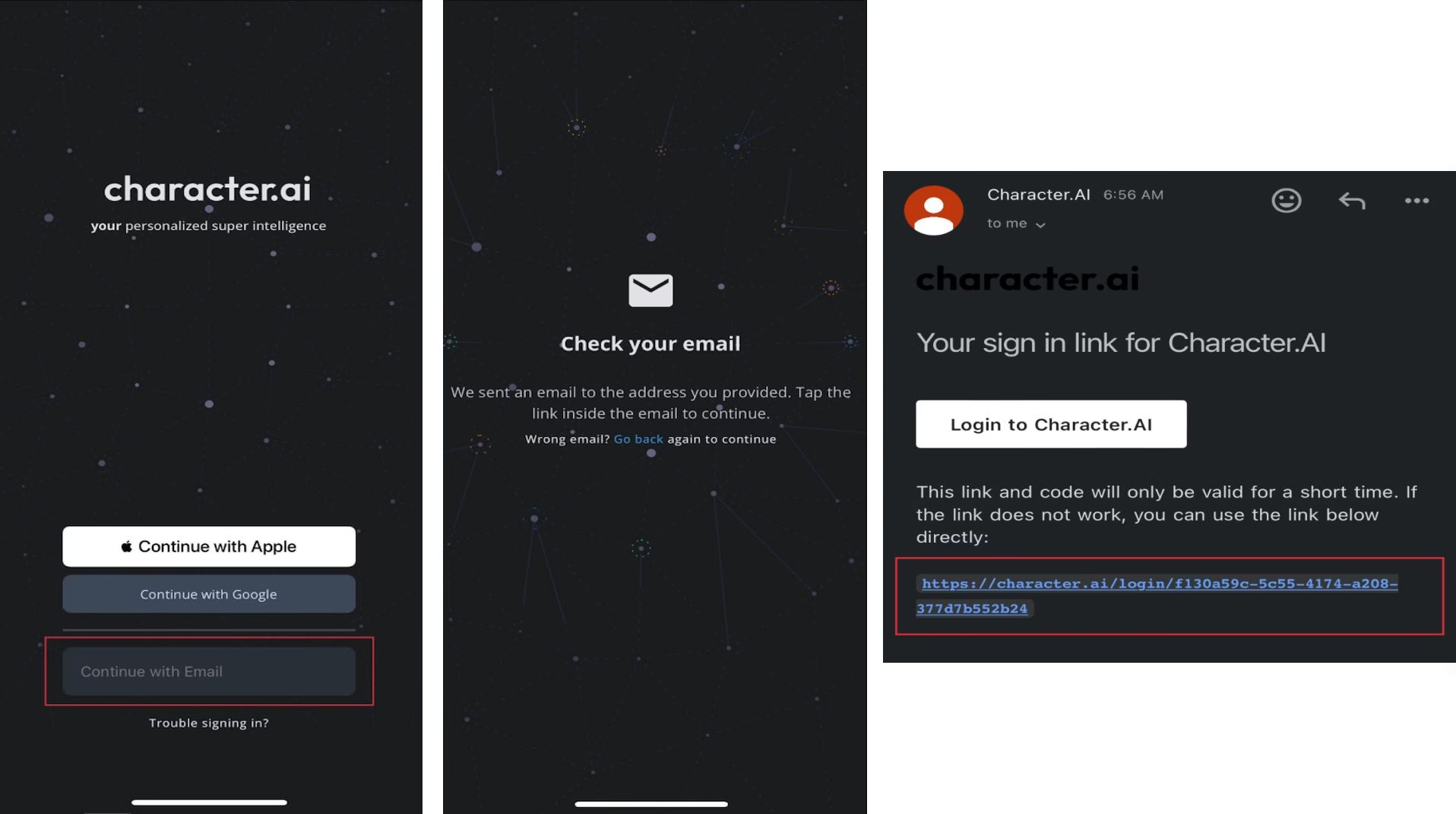
Here’s how to log in on the app:
Open the Character.AI app.
Tap Login.
Choose either Google, Apple, or Email.
For email login, check your inbox for the verification link and tap it to finish.
If the app hangs on a loading screen, force close and reopen it, switch between Wi-Fi and mobile data, and confirm the app is on the latest version.
Age Verification Lockouts and the 7-Day Persona Trap
Age verification is the most common reason an adult C.AI account stops working in 2026, and the recovery path is a support ticket followed by a week of doing nothing.
Character.AI added age assurance through Persona, a third-party identity service. Persona estimates age from a selfie or checks a photo ID, and passes only a pass or fail back to Character.AI rather than the image.
The rollout was regional rather than all at once. The UK went live on January 17, 2026 under the Online Safety Act, Canada landed around the turn of the year, and the US rollout ran through early 2026.
Two error strings come up repeatedly: “Verification currently unable. Please contact support” and a bare “Oops, something didn’t work.” Both mean your attempt was rejected and the automated flow will not let you continue.
Failures cluster around poor lighting, glasses covering the face, an expired ID, a name that does not match the account, or too many attempts in a row.
That last one is the trap. Persona holds a rejected submission for 7 days, so retries inside that window are widely reported to fail again even after support has reset the check.
The sequence that works: file a ticket on the dedicated age verification form rather than a generic bug report, wait for a human to reset the check, then wait out the remaining 7 days before submitting a new photo. Generic bug reports land in a congested queue that answers with automated FAQ links, while the age assurance form routes to the team that can actually clear a blocked account.
If your account is stuck read-only rather than fully locked, that is a different state with its own fix, covered in what to do when Character AI locks your account read-only. For how the selfie check behaves and what happens to your data, see Character AI age verification and when the selfie locks you out.
Why C.AI Says You Are Not Eligible to Use Its Services
“Sorry, you’re not eligible to use our services” is the age gate, and it fires on plenty of adults through a known bug rather than anything you did.
Character.AI announced on October 29, 2025 that it would end open-ended chat for under-18 users, and the restriction took effect on November 25, 2025. Accounts identified as minors moved to a limited creation experience instead of chat.
The genuine cases are simple: a birth date on the account reads as under 18. The false positives are the frustrating ones, and they hit adults on mobile and desktop, often when servers are busy or when signing in through Google or Apple.
On mobile, delete the app, restart the phone, and reinstall. On desktop, open a private window to bypass a corrupted cookie, and switch any VPN off first. Signing out of every Google account in your phone browser, then back into only the one linked to your profile, clears a good share of the rest.
When the C.AI Login Email Never Arrives
Character.AI login links expire 15 minutes after they are sent, so a slow mail provider on its own is enough to lock you out.
The usual suspects are unsupported email domains, a full inbox, or a spam filter routing the link into Promotions or Junk. Search your mail for “character.ai” rather than scrolling folders, and add the domain to your safe senders.
The harder version affects anyone who signed up with Apple’s Hide My Email. The relay address will not deliver Character.AI’s automated mail, so recovery links and data exports never reach a real inbox.
That is recoverable while you still hold a working session. Open the legacy site, go to Settings and then Linked Accounts, add a standard address such as Gmail, and confirm the link sent there. Ordinary email sign-in works again once it is bound.
Separately, iCloud Private Relay at the network level breaks the Google and Apple handshakes on iOS, so turn it off in Safari settings.
Cloudflare Loops, Error 1102 and Forced Logouts
An endless “verify you are human” checkbox is almost always a browser extension corrupting the Cloudflare handshake rather than a Character.AI outage.
Community testing keeps isolating the same four extensions. UserAgent Switcher spoofs your fingerprint and trips the anti-bot heuristic, Referrer Modifier rewrites the referer header to google.com so the token is invalidated on every restart, Canvas Blocker prevents the fingerprint validation Cloudflare needs, and CSS Reloaded breaks the verification frame mid-check.
Disable those, clear cookies for the site, and switch off tracking protection for character.ai specifically. DNS filters such as AdGuard, NextDNS and Pi-hole cause a quieter version of the same problem.
Error 1102 is a different animal. It means Cloudflare could not reach Character.AI’s backend, which points at an outage or at a home IP with a poor reputation, and toggling airplane mode for ten seconds pulls a fresh mobile IP for the second case.
Forced logouts have their own cause. Character.AI shortened its session token lifetime in 2026, and stale cookies from the retired beta subdomain can trap you in a redirect loop.
The fix is heavier than a normal cache clear. Open developer tools with F12, or Command Option I on a Mac, go to the Application tab in Chrome or Storage in Firefox, choose Clear Storage, and click Clear Site Data. That removes IndexedDB, local storage and service worker caches a routine clear leaves behind, and Safari users should also turn off Prevent Cross-Site Tracking.
How to Fix Legacy Login Issues
If your account predates the 2024 change, sign in with your email address through the verification link system. Where that fails, open the legacy site, add a valid new email under Linked Accounts, and use that from then on.
Avoid old bookmarks and cached login pages, clear cookies between attempts, and raise a ticket with Character.AI Support if none of it takes. Switching to a fresh email resolves most of these, though Google sign-in stays unstable for some accounts.
How to Recover Lost Bots and Chats
After the login update, some users found their bots or conversations missing. In most cases, they were still tied to their original accounts, but login mismatches caused confusion.
Here’s how to restore them:
Make sure you are logged into the correct account, not a new one created by mistake.
If your bots are gone, try logging in through both the legacy Character.AI site and the main site to see which one contains your history.
Check your Linked Accounts section under account settings to confirm your email connection.
If you used Discord or Facebook before, those bots can’t be recovered unless you link the same email used during creation.
If you still can’t find your bots, reach out to the Character.AI team via their ticket form at https://support.character.ai/hc/en-us.
Include your email, username, and approximate creation date for faster assistance.
A few users mentioned that adding a new Google account helped restore access to their original data.
For others, patience was key as Character.AI gradually synced older accounts to the new login structure.
Alternative Chat Options While Waiting for Fixes
If you’re locked out of your C.AI account or struggling with verification loops, you can still enjoy AI chat experiences on other reliable platforms.
Some alternatives include:
Candy AI: a fast-growing AI companion platform known for expressive characters and smooth mobile access.
Nectar AI: another option focused on creative storytelling and flexible personas.
These can help fill the gap while Character.AI resolves ongoing login bugs.
You can later return to your C.AI account once the update stabilizes. If you want detailed comparisons, our Character AI alternatives guide covers these tools and their latest features.
Frequently Asked Questions
Why can’t I log in using my old password?
Character.AI removed the traditional password system. You now log in using a verification link sent to your email or through trusted providers such as Google and Apple.
What happened to Discord and Facebook login options?
Those options have been permanently discontinued. You will need to link a valid email to your existing account through the legacy Character.AI site to regain access.
I’m stuck on a loading screen after clicking the login link. What should I do?
Try clearing your cookies and cache for the site, switch to incognito mode, or use a different browser. If the problem persists, submit a support ticket at Character.AI Help Center.
Can I recover my old chats or bots?
Yes, as long as you log into the same account where they were created. If you used a temporary or inaccessible email, link a new one through the legacy Character.AI site.
Why does C.AI say I am not eligible to use its services?
That message comes from the age gate. It fires correctly when a birth date on the account reads as under 18, and incorrectly on a fair number of adult accounts, usually on mobile or through Google sign-in. Reinstalling the app, or a private window with the VPN off, clears most false positives.
How long do I have to wait after a failed age verification?
Seven days. Persona keeps a rejected selfie or ID on file for a week, and any retry inside that window is matched against the cached failure and declined automatically. File a ticket on the age verification form first, then let the week run out before submitting a new photo.
Why is my C.AI login link not arriving?
Login links expire 15 minutes after they are sent, so delivery delays alone can break sign-in. Search your mail for “character.ai” and check Promotions and Spam. If you signed up with Apple’s Hide My Email, that relay address will not receive them at all, so link a standard email to the account.
How do I stop the Cloudflare verification loop on C.AI?
Disable browser extensions that alter your fingerprint or headers. UserAgent Switcher, Referrer Modifier, Canvas Blocker and CSS Reloaded are the four community testing keeps isolating. Clearing site cookies and switching off tracking protection for character.ai handles the rest.
