
Summary
- Create a 30-day plan in manus.im using Agent mode for file outputs.
- Receive a markdown plan, daily checklist, and an ICS calendar file with color coding.
- Import the ICS into Google Calendar to see time-blocked tasks for each day.
- Tweak the prompt to rebalance workloads and regenerate a fresh ICS when needed.
Creating a consistent 30-day plan can feel complicated when you’re balancing multiple goals. Manus 1.5 simplifies this by breaking everything into daily, time-blocked steps you can instantly add to your calendar.
You end up with a color-coded schedule that helps you stay accountable from start to finish.
What makes Manus different is how it works in Agent mode. Instead of simple chat responses, it builds your plan as actual files, markdown outlines, checklists, and Google Calendar imports.
You give it one clear goal, and it returns a complete roadmap ready to execute.
In this tutorial, you’ll learn how to:
Turn your goal into a detailed 30-day plan
Export that plan into a calendar file
Edit and re-generate versions to improve results
Enable Agent Mode on Manus
Before creating your first plan, switch Manus 1.5 into Agent mode. This setting allows it to generate files and handle planning autonomously.
Go to manus.im.
Select Agent mode instead of standard chat.
Type a goal you want to achieve in 30 days, such as Grow my YouTube channel to 1,000 subscribers or Launch an online course.
Agent mode gives Manus permission to build and export structured outputs.
You’ll receive multiple files:
A markdown overview of the 30-day plan
A detailed daily checklist
A color-coded calendar file (.ics)
A summary highlighting key tasks and “power hours”
Once this is set, Manus is ready to process more advanced prompts.
Write the Perfect Goal Prompt
A detailed prompt makes or breaks your plan. The more precise you are, the better Manus can distribute your workload across 30 days.
Use this exact structure:
Replace the bracketed goal with your own. If you are planning multiple projects, focus on one per session to keep things clear.
After submitting the prompt, Manus will generate:
A 30-day markdown plan you can review in detail
An .ics file for direct calendar import
A summary listing each week’s focus areas
You can adjust or re-run your prompt if you want different time allocations.
For example, shorten content creation time and increase outreach blocks if your target involves sales or audience growth.
Generate and Import the Calendar
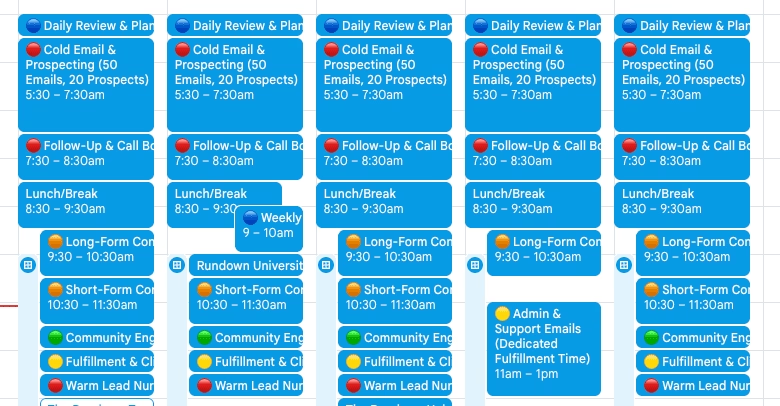
Once Manus 1.5 finishes processing your prompt, it provides an ICS file along with your markdown and checklist outputs.
This file contains your 30-day schedule with color-coded tasks based on priority. Importing it into Google Calendar makes your plan visual and actionable.
Here’s how to import your ICS file:
Download the .ics file generated by Manus.
Open Google Calendar on your computer.
Click the “+” icon next to Other calendars.
Select Import.
Choose your downloaded .ics file and select the destination calendar.
Once imported, you’ll see your full 30-day plan, organized by time blocks and color codes:
🔴 Outreach tasks
🟠 Content creation sessions
🟡 Fulfillment and delivery
🟢 Community engagement
🔵 Planning and reflection
Each day now contains focused, balanced actions. You can open any task to see its notes or reminders created by Manus.
Customize and Regenerate Your Plan
The beauty of Manus 1.5 lies in its adaptability. You don’t have to settle for the first version. If any day feels too heavy or light, you can regenerate the entire plan in minutes.
Start by adjusting your original prompt. For example:
“Increase morning content time by 30 minutes”
“Add more outreach blocks on weekends”
“Reduce community engagement frequency to three times per week”
Then re-run the updated prompt in Agent mode. Manus will automatically recalculate your schedule and export new files, ready for import again.
If you notice certain activities take longer than expected, tweak them in the prompt and re-generate the .ics file. The goal is to make your schedule realistic enough to follow daily without burnout.
Pro tip: Regenerate your plan every four weeks to match new targets or priorities. Consistency compounds when each cycle builds on the last.
