
What’s Changed: There is no way to remove or disable the Character AI filter. It runs on Character AI’s servers across three layers, so nothing installed on your device can touch it. Every method that circulates online (jailbreak prompts, OOC notes, creative spelling, browser extensions, modded APKs) fails against server-side moderation, and several carry real risk. What does work is reducing false positives, and that is worth knowing because most blocks people hit are false positives.
Most guides on this topic promise a trick. They are describing a system that stopped existing around 2024.
The filter moved from keyword matching to context-aware evaluation, and it runs entirely on Character AI’s infrastructure before any text reaches your screen. That single fact invalidates every client-side workaround, which is most of them.
What follows is what the block message means, why it fires on harmless messages, which methods still fail in 2026 and why, and the handful of things that genuinely cut down how often you see it.
What this content has been filtered means
The message means Character AI’s servers evaluated either your input or the model’s reply and stopped it before rendering. The decision happens remotely, which is why no setting or download changes it.
Moderation runs across three layers. The input layer scans your message before it sends, so a blocked message never leaves your device with a result. The generation layer restricts what the model may produce while it writes.
The output layer is the one people find most confusing. It lets the bot start typing, evaluates the response as it forms, then erases the message before completion. Seeing a reply appear and vanish looks like a bug, and it is the filter working exactly as designed. The variant wording gets covered in our note on replies that break guidelines.
Why it fires on completely innocent messages
The filter judges conversational trajectory rather than individual words, so a harmless sentence can be blocked because of what came before it. This is the single biggest source of frustration and the least understood part of the system.
A few specific causes account for most false positives:
- Trajectory, not vocabulary. If preceding turns carried escalating tension, a mild follow-up gets read as part of that arc and flagged accordingly.
- Probability rather than fixed rules. Output moderation is a probability model, so identical phrasing can pass in one session and fail in another.
- Character archetype. Yandere, villain and possessive personalities statistically produce riskier output, so the system watches those chats more closely from the start.
- Dual-meaning words. Fight scenes and even cooking prompts trip checks on words like “beating” that carry a second reading.
- Client differences. The mobile app reports noticeably higher false-positive rates than the desktop browser.
That last point is the cheapest fix in this article. If you do long roleplay sessions on your phone and hit constant blocks, running the same chat in a desktop browser reduces them measurably.
What does not work, and why
Every method that tries to trick or disable the filter fails, because none of them can reach the server where moderation happens. Here is the honest status of each one that circulates.
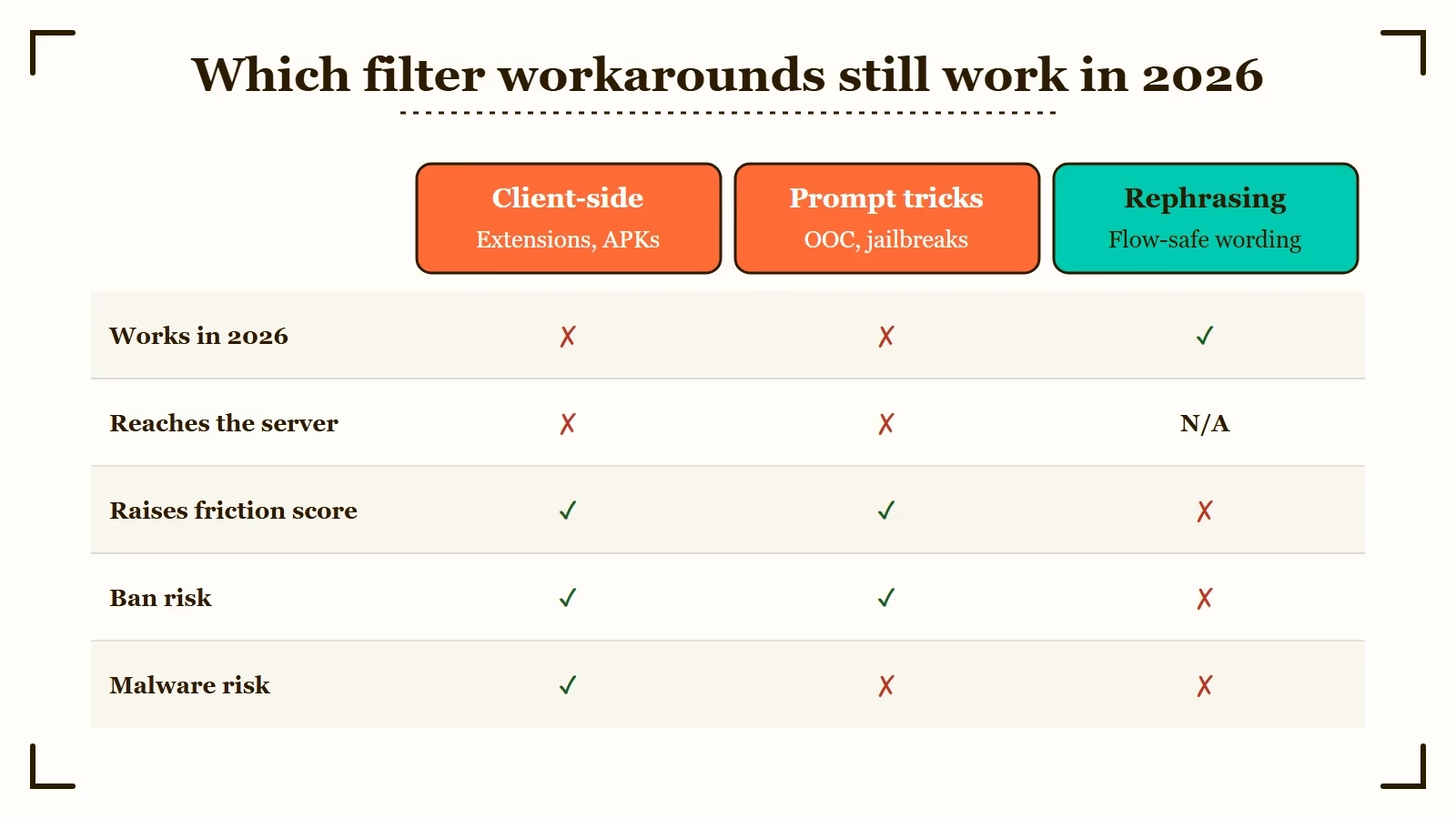
| Method | Works in 2026 | Why |
|---|---|---|
| OOC notes in brackets | No | The output layer scans all generated text regardless of parentheses |
| Creative spelling, unicode, codewords | No | Intent-based scanning reads semantic context, not letter patterns |
| Persona instructions overriding rules | No | Personas anchor character traits, they do not carry authority over safety checks |
| Jailbreak and ignore-policy copypastas | No | Moderation runs independently of prompt content, and injections get patched |
| Browser extensions | No | Extensions modify local CSS and JavaScript, never server output |
| Modded filter-remover APKs | No | Client apps contain no filtering logic at all |
| Rephrasing and gradual pacing | Yes | Keeps content inside the boundary rather than trying to cross it |
Only the last row works, and it works because it is not a bypass.
There is a cost to trying the others beyond wasted time. Repeatedly triggering blocks, spamming regeneration, or pasting jailbreak prompts builds a hidden friction score on that conversation.
The friction score nobody mentions
A chat thread that repeatedly trips moderation accumulates an internal penalty, which makes that specific thread slower and more sensitive than a fresh one. This is why two people describe the same filter completely differently.
High friction shows up as longer generation times, thinking loops, degraded reasoning and false positives on neutral messages. The chat feels broken, and the platform looks like it changed overnight.
It did not change. That one conversation got flagged as high-risk and the model is now handling it more cautiously than it handles a new chat. Plenty of people reach the same wrong conclusion, which is why filter complaints spike in waves.
Before: You hit six blocks in a row, regenerate each one four or five times, and paste a jailbreak prompt to force it. Responses slow down, the character starts missing obvious context, and neutral messages begin getting filtered.
After: You open a new chat, carry the world and relationship across using Pinned Memories or Facts, and continue the story. Generation speed returns to normal and the false positives stop.
Why modded APKs are the one genuinely dangerous option
Filter-remover APKs cannot work, because the client app contains no filtering code, and downloading them exposes your device and account to real harm. This one gets its own section because it is the only method on the list that can hurt you.
Moderation lives on Character AI’s servers. Modifying the app binary on your phone changes the interface and nothing about what the servers permit, so these files cannot deliver what they advertise even in principle.
What they do deliver is risk. APKs distributed on third-party forums are a well-documented vector for malware, keyloggers and credential theft, and installing one means handing an unknown binary your login. Using a modified client also violates the terms of service and gets accounts banned.
The trade is a guaranteed security risk in exchange for a capability the file cannot possibly have.
What genuinely reduces how often you get blocked
These five techniques work because they stay inside the rules rather than trying to break them. In practice they cut most people’s block rate substantially.
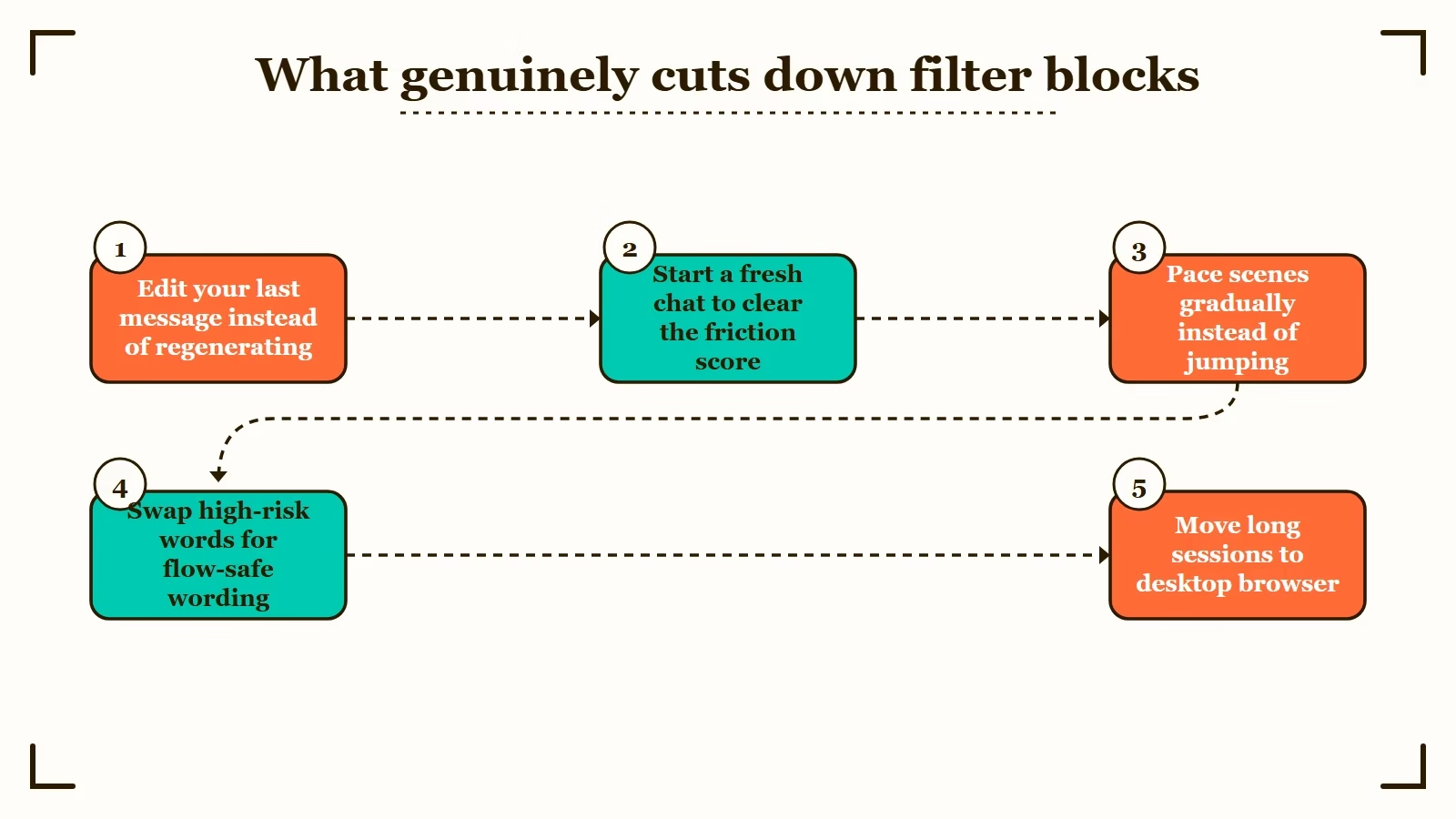
- Use the edit button instead of regenerating. When a reply vanishes, tap Edit on your own preceding message, soften one high-risk word or tone cue, and resend. This re-runs the generation layer without resetting anything, and it is faster than swiping for a different roll.
- Refresh the context when a thread goes bad. If blocks have piled up, start a new chat and carry the story over through Pinned Memories, Story Memory or Facts. This clears the friction score without losing your world-building.
- Pace scenes gradually. Sharp jumps in dramatic or physical intensity raise the probability of an output block. Building the same beat across several messages usually passes where one leap does not.
- Substitute flow-safe vocabulary. Swapping high-risk action and romance terms for less loaded phrasing (“clash of steel” over “violent attack”, “commanding presence” over “forceful control”) keeps meaning while lowering the trigger probability.
- Move long sessions to desktop and verify your age. The browser client filters less aggressively than the mobile app, and completing age verification moves an adult account out of the restricted mode that unverified accounts get routed into.
None of these unlock explicit content. They reduce the wrong blocks, which is where most of the frustration sits.
If the filter itself is the dealbreaker
No configuration of Character AI produces an unfiltered experience, so if that is the requirement, the answer is a different platform. We have covered the reasons in depth separately.
The filter status question gets a full answer in has the filter been removed, including why paying for c.ai+ changes nothing about moderation. The wider platform story sits in what happened to Character AI.
For platforms without a filter, our no-filter chatbot guide and the Character AI alternatives roundup cover the current options and their real limits. Candy AI is the closest drop-in replacement if you want no setup, though its conversational memory is weaker than Character AI’s over long arcs.
Worth understanding the context before you decide. The filter tightened in response to sustained legal pressure, including settlements reported by The Guardian in January 2026, so it is not a policy likely to reverse.
Frequently Asked Questions
Can you turn off the Character AI filter in settings?
No. There is no setting, toggle or hidden menu. Moderation runs server-side and is not user-configurable.
Do filter bypass prompts still work?
No. Server-side moderation runs independently of what your prompt says, and injection attempts get patched through model updates while raising your thread’s friction score.
Are Character AI mod APKs safe?
No. They cannot remove a server-side filter, and third-party APK downloads are a known vector for malware and credential theft. They also get accounts banned.
Why does the filter block innocent messages?
It evaluates the whole conversation’s trajectory rather than single words, so a mild message can be flagged because of the tension in preceding turns.
Does c.ai+ reduce filtering?
No. The subscription changes speed, ads, memory and model access. Moderation rules are identical on free and paid accounts.

I’m guessing that Candy AI no longer exists, because every link is broken.
I’ve just checked and it seems the links are working. Would you let me know what you’re seeing when you click?